
If added by accident or the information is no longer correct, you can remove an allergy from a patient in eRx.
Note: You can access eRx according to your security rights.
Important: Any allergies you remove from a patient in eRx do not synchronize with the patient allergies set in Ascend Academic
To remove an allergy
How to get to there
-
From the Patient menu, clicktap Prescriptions to display the Patient Prescriptions page.
-
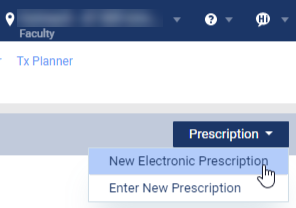
ClickTap the Prescription drop-down menu and select New Electronic Prescription.
Note: If logging in as a proxy clinician, you are prompted to select the clinician you are acting on behalf of.
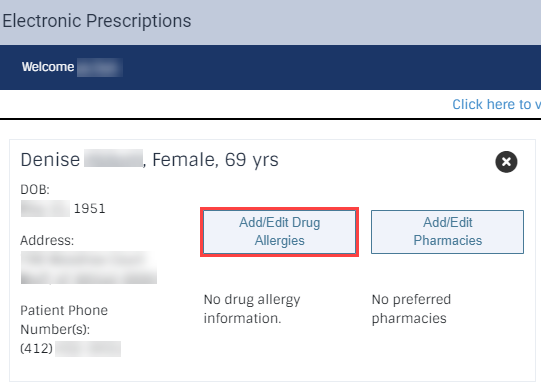
The Electronic Prescriptions window and the Patient Details page display.
-
On the Patient Details page, clicktap the Add/Edit Drug Allergies button to display the Add Drug Allergy section.
-
Under Current Drug Allergies, next to a listed drug allergy, clicktap the X icon.

-
When prompted, clicktap Yes to confirm your removal.
The allergy is removed from the Current Drug Allergies list.
Comments
0 comments
Please sign in to leave a comment.