
You can remove medications from a patient's profile in eRx.
Note: You can access eRx according to your security rights.
To remove a medication
How to get to there
-
From the Patient menu, under General, clicktap Prescriptions.
The Patient Prescriptions page displays.
-
ClickTap the Prescription drop-down menu and select New Electronic Prescription.
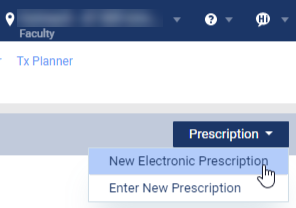
Note: If logging in as a proxy clinician, you are prompted to select the clinician you are acting on behalf of.
The Electronic Prescriptions window and the Patient Details page display.
-
On the Patient Details page, clicktap the Active Medications tab.

-
Next to a listed medication, clicktap the Actions drop-down menu and then select Remove to display a Remove Active Medication? window.
-
Select one of the following radio buttons to state the reason for the removal:
-
Completed
-
Discontinued
-
Duplicate/Mistake
-
-
ClickTap OK.
Comments
0 comments
Please sign in to leave a comment.