
When necessary, you can re-order a medication that has been ordered in the past from a patient record in eRx. This means a copy of it will move to the Pending Medications list and the same prescription will queue up for the original pharmacy.
Note: You can access eRx according to your security rights.
To re-order a medication
How to get to there
-
From the Patient menu, under General, clicktap Prescriptions.
The Patient Prescriptions page displays.
-
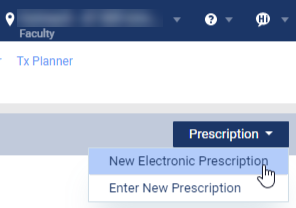
ClickTap the Prescription drop-down menu and select New Electronic Prescription.
Note: If logging in as a proxy clinician, you are prompted to select the clinician you are acting on behalf of.
The Electronic Prescriptions window and the Patient Details page display.
-
On the Patient Details page, clicktap the Active Medications tab.

-
Next to a listed medication, clicktap the Actions drop-down menu and select Reorder.
This makes a copy of the printed or electronic prescription and moves it to the Pending Medications list. It also queues up the same prescription to the original pharmacy.
Note: Both values can be edited before sending.
-
Continue to send the prescription to complete the re-order process.
Comments
0 comments
Please sign in to leave a comment.