
You can add patient-reported prescriptions to a patient in eRx.
Note: You can access eRx according to your security rights.
To add a patient-reported prescription
How to get to there
-
From the Patient menu, clicktap Prescriptions to display the Patient Prescriptions page.
-
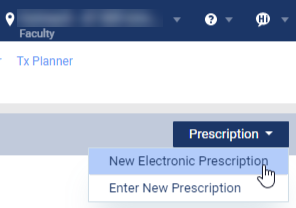
ClickTap the Prescription drop-down menu and select New Electronic Prescription.
Note: If logging in as a proxy clinician, you are prompted to select the clinician you are acting on behalf of.
The Electronic Prescriptions window and the Patient Details page display.
-
On the Patient Details page, clicktap the Add Patient Reported button to display the Add Patient Reported Medication section.

-
Enter a medication name in the search bar.
-
From the auto-completed drop-down list, select the correct medication.
-
If necessary to add additional patient reported prescriptions, repeat Step 3.
-
ClickTap Save.

Comments
0 comments
Please sign in to leave a comment.