
You cannot delete a prescription saved in a patient's record, but you can void it.
Note: When you display the Patient Prescriptions page and void a prescription, these actions are recorded as two logs in the Audit Log page as Prescription types with "Prescription reviewed" in Details.
To void a prescription
How to get there
-
From the Patient menu, under General, select Prescriptions.
The patient's Patient Prescriptions page displays.
Note: If the correct patient is not already selected, use the Patient Search field to access the patient's record.
-
On a patient's Patient Prescriptions page, expand the sections to locate a prescription written in the last six months, six months to a year ago, or longer than a year ago.

Tip: You can search by drug name in the Search field to narrow the list.
Any matching prescriptions display in the expandable and collapsible sections by time frame (e.g., 0-6 months).
-
Select a listed prescription to display the prescription information.

-
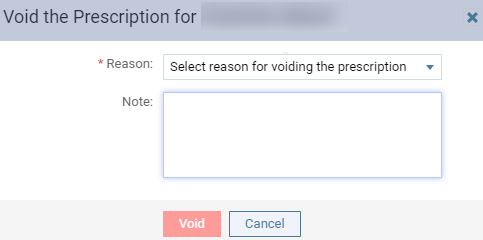
ClickTap Void Prescription to display the Void the Prescription for [xxx] window.
-
From the Reason drop-down list, select why you are voiding the prescription, and, in the Note field, enter any relevant information.
-
ClickTap Void.
Comments
0 comments
Please sign in to leave a comment.