
The October 2026 product update includes two feature improvements and one bug fix.
The major improvements in this release include the following:
-
Clinical
-
Settings
One bug fix is also included in this release
Clinical
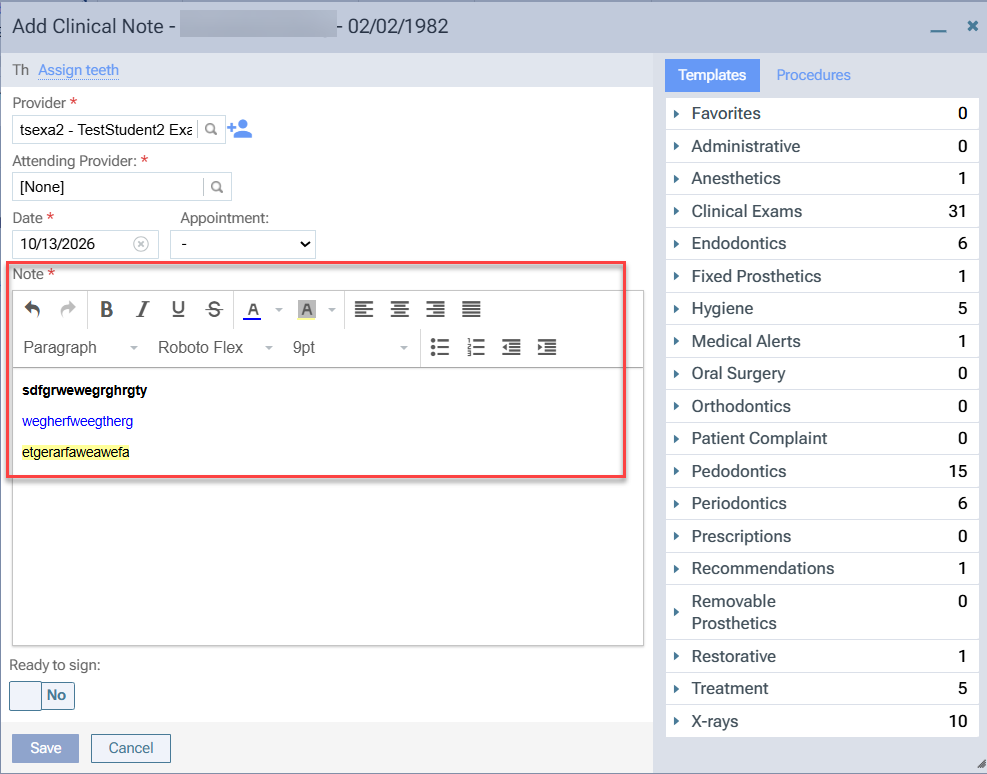
Enhanced formatting options for clinical notes
Users can now apply rich text formatting options such as bold, italic, underline, font color, and text highlighting in clinical notes (Patient > Clinical > Chart > Clinical Notes). This enhancement helps emphasize important information and improves the readability of clinical notes. Formatting is preserved when clinical notes are saved and viewed later.
Settings
Manage medical alert permissions separately
We have separated the Edit/Delete medical alerts permission into (new) Edit medical alerts and Delete medical alerts permissions. Administrators can now use both permissions to provide more precise control over whether users can edit and/or delete medical alerts.
Note: Roles that previously had the combined Edit/Delete medical alerts permission will retain both permissions after the update.
Bug Fix
Student Progress appears blank when required configurations are missing
Issue: Users were unable to view Student Progress (Academic > Student Progress) when required configurations, such as user groups or Progress Summary categories, were not set up.
Solution: Fixed to display the messages "This view requires user groups to function. Please create at least one user group via Settings → User Groups to use this view." and "This view requires categories to function. Please create a configuration via Settings → Academic → Progress Summary." when the required configurations are missing.
Comments
0 comments
Please sign in to leave a comment.