
The August 2026 product update includes two feature enhancements and one bug fix.
This release includes the following enhancements:
-
Evaluations
-
Clinical
One bug fix is also included in this release.
Evaluations
Improved workflow for tooth chart submissions by multiple evaluators
We have improved the tooth chart submission workflow for multiple evaluators working on the same tooth chart.
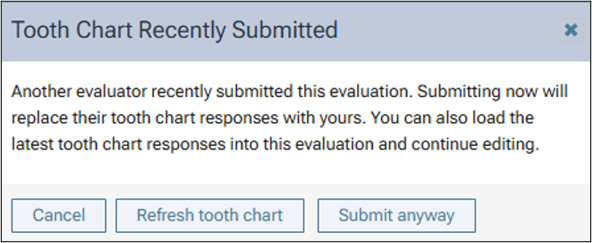
When an evaluator submits a tooth chart, a (new) Tooth Chart Recently Submitted message now displays if another evaluator submitted changes to the same chart during the editing session. This helps evaluators make informed decisions when another evaluator has submitted changes and reduces the risk of unintentionally overwriting recently submitted tooth chart responses.
If prompted with the message, the evaluator can close the window using any of the following options:
Cancel: Returns to the evaluation without submitting changes.
Refresh tooth chart: Loads the most recently submitted tooth chart so the evaluator can continue editing with the latest responses.
-
Submit anyway: Replaces the recently submitted tooth chart with the evaluator’s current changes.
Note: This enhancement applies only to tooth chart responses. Question responses and Patient Complexity selections are not refreshed, replaced, or otherwise affected by this workflow.
Clinical
Updated handling of clinical notes for simulation patients
We have updated the handling of clinical notes for simulation patients to help prevent in-progress clinical notes from remaining after a simulation patient is deleted. When a simulation patient is deleted, any associated in-progress clinical notes are automatically removed, and an audit log entry is created for each deleted clinical note.
This change helps maintain data integrity and prevents incomplete clinical notes from blocking edits to related clinical note templates and quick-picks.
Bug Fix
Non-provider users receive an unclear error message when modifying treatment plan procedures
Issue: When a non-provider user who requires approval for treatment plan changes modifies a treatment plan procedure, an unclear error message displays after approval credentials are entered.
Solution: Fixed to display the following message: "Non-providers cannot create approval requests. You can grant this user the right to edit without approval, or assign them provider status."
Comments
0 comments
Please sign in to leave a comment.