
As you work with existing treatment plans, you may need to request approval to update the Draft status to Pending Faculty Approval status.
Note: To request approval of a treatment plan, you must have the Requires approval for Treatment Plan cases user role permission set.
To request approval for a treatment plan
How to get there
-
Use the Patient Search field to access a patient's record.
Notes:
-
If the last patient record you accessed since you last logged on is the correct patient's record, you do not need to re-enter the patient's name in the Patient Search field.
-
You can include inactive patients in the search results by setting the Include inactive patients toggle switch to On.
Important: If the Access Confidential Patient window displays after selecting the patient from the search results, it means the patient is a confidential patient and you don't have the security rights to access their record. To continue, a user with the security rights must enter their credentials into the window. Once given access, you have access to the patient's information until your session expires.
-
-
Complete one of the following:
-
From the Patient Information ribbon, clicktap the Tx Planner link.

-
From the Patient menu, under Clinical, clicktap Treatment Planner.
-
From the Patient menu, under General, clicktap Overview.
The patient's Overview page displays.
ClickTap the Treatment Plan widget.
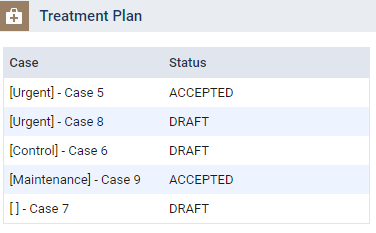
The patient's clinical record displays with the Treatment Planner tab selected.
-
-
On the Treatment Planner tab of a patient's clinical record, review the listed treatment plans and categories.

-
ClickTap Request Approval to open the Request Treatment Plan Approval window.
The treatment plan(s) are grouped according to the set Phase, and cases are listed in alphabetical order by case name under each Phase.

-
(Optional) Enter a faculty provider in the Attending Provider field and select them from the generated search results to assign the faculty provider to the approval request.
Note: By assigning a faculty provider to the approval request, users can search for the approval request by its attending provider on the Pending Approvals page.
Important: If the field auto-populates a faculty provider, it means the patient already has a pending treatment plan approval request. As patients can only have one pending approval request, the field auto-populates the faculty provider assigned to the existing approval request for consistency. You can keep the populated faculty provider to apply the same provider to the treatment plan cases in the new approval request, apply a different faculty provider, or set the field to [None] to submit a new approval request without an attending provider. Any changes to the field will be applied to the existing treatment plan cases pending for approval.
-
Next to each treatment plan you want approval for, select the check box(es), and then clicktap Submit.
The status displays as Pending Faculty Approval.
Note: When the faculty member approves the request, the status auto-changes to Pending Patient Consent.
Comments
0 comments
Please sign in to leave a comment.