
A new feature enhancement is included in the product update released in early July 2018. The enhancement in this release is the ability to create and manage operatory groups.
Create and manage operatory groups
From Settings > Location > Operatory Groups, you can now create and manage operatory groups. These help staff schedule appointments when working with a large number of operatories.

Depending on their permissions, users can:
-
Create and name operatory groups.
-
Search for operatories.
-
Add/remove operatories to or from operatory groups.
-
Review operatory groups.
-
Delete operatory groups.
Note: Each operatory group must have a unique group name and at least one selected operatory.
Operatory Groups also appear as a search filter in two other places. These include:
-
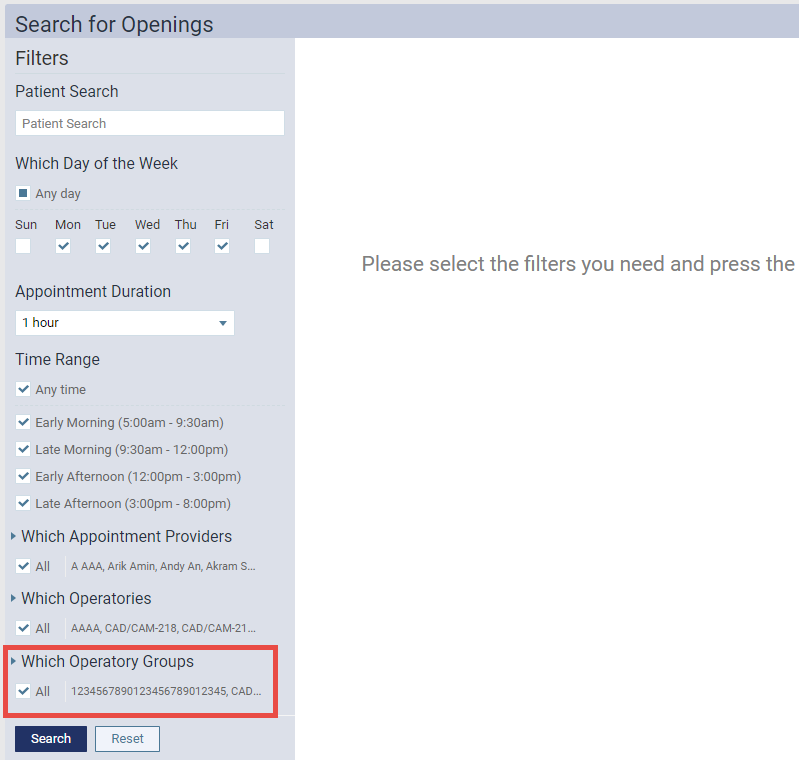
The Search for Openings pane offers a Which Operatory Groups section that filters by operatory group.
-
The Calendar screen > View drop-down menu now offers a Operatory Group radio button that customizes your view of the schedule. If selected, this button displays operatory group check boxes at the bottom of the list.

Comments
0 comments
Please sign in to leave a comment.