
New feature enhancements are included in the product update released in late April 2018. The major enhancements in this release include new functionality when you send billing statements.
Electronic billing statements functionality added
You can now send billing statements electronically.
From the Patient Information page > Preferences tab, you can now:
-
Set the patient's billing preference to By Mail or By Email from the new Preferred Statement Delivery Method field.
Note: If the patient is not their own primary guarantor, the Preferred Billing Statement Delivery Method field displays See [primary guarantor name] for delivery preferences. You must click primary contact name link to open the primary contact's Patient Information page > Preferences tab.
When generating billing statements from the Generate Billing Statements window, you can now:
-
Filter the results according to a new option: Skip if billed in the last ___ days.
Note: The default value is 30.
-
Filter the results to exclude patients who have had a statement submitted electronically within a specified number of days.
-
Filter the results by the selected delivery method using one of the following options:
-
Email if address exists, Mail to rest
-
Only to patients with a preference of Email
-
Only to patients with a preference of Mail
-

When sending billing statements, the Billing Statements screen now displays a Submit Electronically button to send the statements electronically to the DMA.
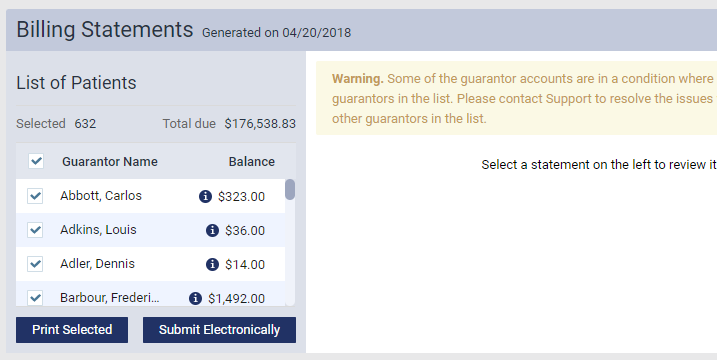
Note: Once clicked, you are prompted with a Charge Notification window. It indicates the number of statements, the per statement fee and the total charge.
Example: "Submitting 90 statements with a with a charge of 0.57 per statement will cost $51.30. Are you sure you wish to continue?".
-
Click Yes to send the selected statements to DMA for processing. The system message "The billing statements have been submitted" displays.
-
Click No to cancel and return to the Billing Statements screen.
Note: You can also view the Last Billed Date (last submitted statement) when viewing the list of Generated Patient Statements.
Comments
0 comments
Please sign in to leave a comment.