
A new feature enhancement is included in the product update released in mid-September 2022. The major enhancement in this release is a new user role permission that controls the ability to print images.
Important: The enhancement from this release will be available on PROD on September 16th, 2022.
New user role permission that controls the ability to print images
Currently, all images printed from Ascend Academic contain patients' name and date of birth. To limit users' access to these Personally Identifiable Information (PII) data, we added a (new) Print Patient Images user role permission (Settings > Location > User Roles) that controls the ability to print patient images.
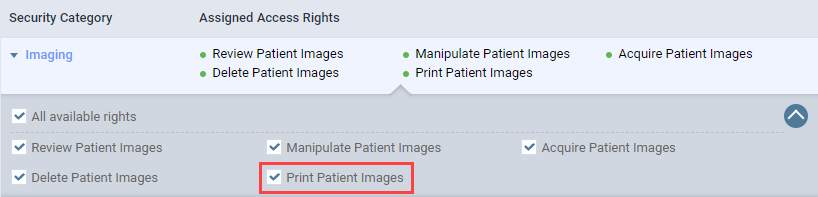
If you attempt to print an image without the new user role permission set, a "Access Denied: Contact your office administrator" error message displays. Specifically, when you clicktap Print on the Exam or Image(s) to be shared window (Patient > Clinical > Imaging).

On deployment, the user role permission will be set automatically for all users that meet any of the following conditions:
-
Has an Administrator user role account
-
Has the security rights to import/export images
-
Has the Review Patient Images user role permission set
Important: The enhancement is available for both US and Canadian organizations, but the user role permission only works for the US organizations. For the Canadian organizations, the functionality will be added later in the future.
Surface information on procedures don't display for Canadian organizations
Issue: When users in Canadian organizations view information on procedures that require tooth and surface(s) information, the surface(s) information doesn't display in the system.
Solution: Fixed so it displays as expected.
Comments
0 comments
Please sign in to leave a comment.