
Several new feature enhancements are included in the product update released in mid-March 2022. The major enhancements in this release include improved filter on the User column of the Audit Log, new workflow on changing a procedure in an approved treatment plan case, new ability to set inactivity timeout in bulk user import workflow, and e-mail addresses of locations display on the Patient Communications page.
Improved filter on the User column of the Audit Log
Previously, to refine the audit log (Home > Reports > Audit Log) by a specific user, users had to select them from the drop-down list in the User column.
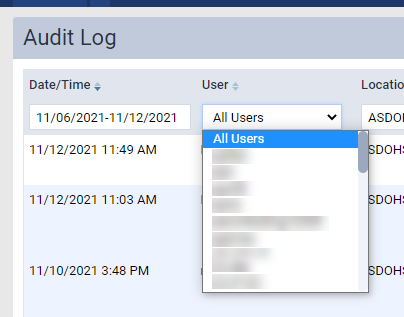
The filter also only displayed users by their username, which made it difficult to locate users. To make it easier, we've replaced the drop-down list with a search engine that allows you to search for a user by their Lastname, Firstname, and username.

New workflow on changing a procedure in an approved treatment plan case
Previously throughout axiUm Ascend, if users edited a procedure that's part of a treatment plan case approved by faculty and has multiple procedures, the entire case (Patient > Clinical > Treatment Planner) was moved back to Pending Faculty Approval. To move back to Pending Patient Consent or Accepted, the entire treatment plan case needed to be re-approved by faculty. As re-approval of the entire case is unnecessary, student providers are now prompted by the system to enter a faculty credentials to authorize the changing of an accepted procedure. Once updated, the case is moved to Pending Patient Consent. Also, the modification is recorded in the treatment plan case's history.

To authorize the change, the system needs the credentials of faculty that has the (new) Approve Treatment Plan procedure updates user role permission set. If they enter the credentials of a faculty that doesn't have the new permission, the system won't authorize the change. Approve Treatment Plan procedure updates is dependent on the Manage Treatment Plan case user role permission. With this release, the new permission will be automatically set for all existing user roles that have the Approve Treatment Plans user role permission set.
Important: This new workflow only applies when you edit a procedure's code, tooth, surface, class5, amount, or if the procedure is deleted. Changes to the date, provider, bill to insurance, note, options, insurance estimate, and diagnosis doesn't require approval, and won't be prompted to be authorized by faculty.
New ability to set inactivity timeout in bulk user import workflow
When importing new user accounts from a file (Settings > Location > User Accounts), users can now use the (new) Set Inactivity Timeout to drop-down list to set how long axiUm Ascend can be inactive before the imported users are logged out automatically.

It displays as a mandatory field on the Import Users from File: "[name of file].csv" window > Roles and Locations tab. The Next button on this window won't enable until you set the field. After import, the set inactivity timeout is applied to all imported users. If necessary, you can adjust it accordingly based on individual users' preferences after the import.
E-mail addresses of locations display on the Patient Communications page
On the Patient Communications page (Settings > Patient Care > Patient Communications), location information now display with the location's e-mail address if they have one in the system.

The e-mail address displays for all 3 tabs of the page. If the location doesn't have an e-mail address in the system, it doesn't display on the page.
New user role permission that allows access to academic reports
Previously, everyone could view existing academic reports regardless of their security rights, as there was no user role permission that controlled access to them. Hence, we added a (new) Academic Reports user role permission (Settings > Location > User Roles) that gives you the ability to only view academic reports without the ability to modify them.
An action on one open deposit slip report applied to all open deposit slip reports
Issue: When users open a deposit slip report in multiple browser tabs, and then apply different filters and preview, print, or export at the same time, the filter settings from the first completed report is applied to the rest of the report. For example, one tab if running a report for January, and another tab is running a report for February. If the January report is completed first, the other tab displays the January report once it's completed, not the February report.
Solution: Fixed so the action isn't applied to other open reports.
Error when deleting a patient's e-mail address from their record
Issue: When users create a patient with the patient's e-mail address in their record in an organization that doesn't have electronic billing statement feature enabled, and later attempt to update the patient's record by removing the e-mail address, an error occurs.
Solution: Fixed so users can remove patient's e-mail address from their record as expected.
Error when updating recurring events with different time zone
Issue: When users attempt to edit a recurring event using a device that has a different time zone from the logged in location's time zone, the event's date range and type may also automatically change.
Solution: Fixed so the system doesn't make unwanted changes.
Comments
0 comments
Please sign in to leave a comment.