
Several new feature enhancements are included in the product update released in late August 2021. The major enhancements in this release include improvements to inactive providers, new patient demographic fields to power reports, and new behavior to the Manage clinical note templates user role permission.
Improvements to inactive providers
Several changes have been made throughout axiUm Ascend to help users handle inactive providers more efficiently:
-
The Inactivate Provider - [name of provider] window (Settings > Location > User Accounts), which displays when you deactivate a provider, no longer includes activities from linked patient(s) that are inactive.
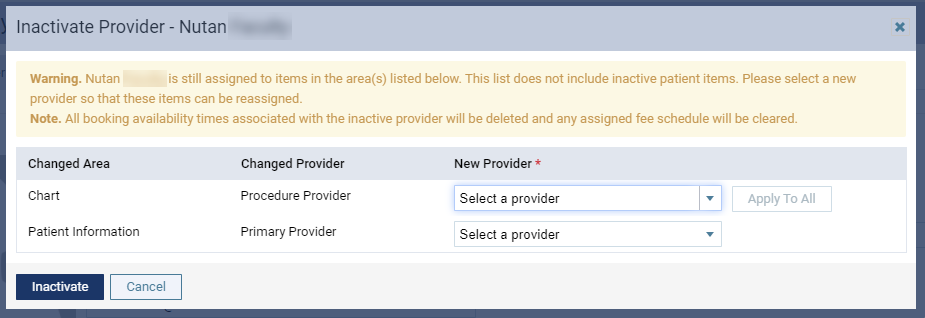
We've also updated the warning message on the window to clearly state the generated list doesn't include activities from inactive patient(s).
-
If an inactive patient has an inactive provider, their Patient Information page (Patient > General > Patient Information) displays with a (new)
 icon on the Basic Info tab > Primary Provider field.
Note: The inactive provider also displays with a (new) (inactive) label.
When clickedtapped, a Warning tooltip displays, informing you to assign an active provider to the patient.

If you attempt to edit the patient's account and save without changing the primary provider, a (new) Warning window displays.

The window will continue to display until you either assign a new primary provider that's active or remove the inactive provider, leaving the patient without an assigned primary provider.
Once changed and saved, the action is audited in the Audit Log with the old and new value of the provider.
New patient demographic fields to power reports
For all analysis and interactive report builders (Home > Reports > Power Reporting), we have added (new) Ethnicity, Financial Status, and Special Needs fields to the Patient module.

Users can use these new fields to generate a report on patient demographic information, which can be submitted to the government or public registries to raise funding. You can also use the fields as filters.
Tip: You can use the fields as rows to display them as columns.

New behavior to the Manage clinical note templates user role permission
Previously, users needed to have the Manage clinical note templates user role permission set to manage their list of favorite clinical note templates (Patient > Clinical > Chart, Progress Notes, Quick Exam, Treatment Planner, or Perio).

This has led to an unintentional step in the workflow, where students must request for access to the user role permission every time they need to manage their list of favorites. Hence, we've updated axiUm Ascend to no longer need it to manage it. Students can now manage their lists without requesting an update to their security rights.
Billing Type Code and Billing Type Description doesn't display data on analysis report builders
Issue: When users use an analysis report builder with Billing Type Code and/or Billing Type Description, the fields doesn't display any data.
Solution: Fixed so it displays properly.
Can't configure the Progress Summary report because the search engine for procedures doesn't work properly
Issue: When users attempt to configure the Progress Summary report by adding or editing a category, the Procedure Search field doesn't display any search results, preventing them from adding a valid procedure code.
Solution: Fixed so the search engines works properly.
The Patient Clinical Report times out and can't be used to generated reports
Issue: When users attempt to use the Patient Clinical Report, the Setup steps bar spins for a minute and the page is non-responsive.
Solution: Fixed so it works as expected.
axiUm Ascend doesn't send automated text notifications on upcoming appointments to patients
Issue: axiUm Ascend doesn't send appointment reminders as automated text messages to all patients.
Solution: Fixed so automated text messages are sent as expected.
Comments
0 comments
Please sign in to leave a comment.