
Several new feature enhancements are included in the product update released in late July 2021. The major enhancements in this release include new fields to capture patient demographic, new power reports, and application of comments on patient complexity.
New fields to capture patient demographic
On the Basic Info tab on the Patient Information page (Patient > General > Patient Information), we have added the following drop-down lists to collect more detailed patient demographic information:
-
Ethnicity
-
Financial Status
-
Special Needs
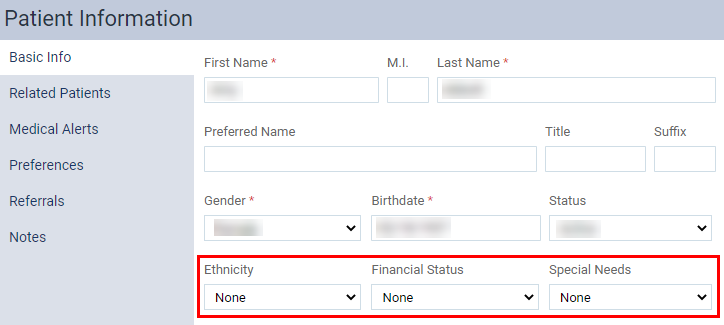
By default, these drop-down lists are set to None, and are not required fields.
Administrators can customize the drop-down lists' options by customizing the (new) Ethnicity, Special Needs, and Financial Status custom pick lists in the Patient category on the Custom Pick Lists page (Settings > Location > Custom Pick Lists).
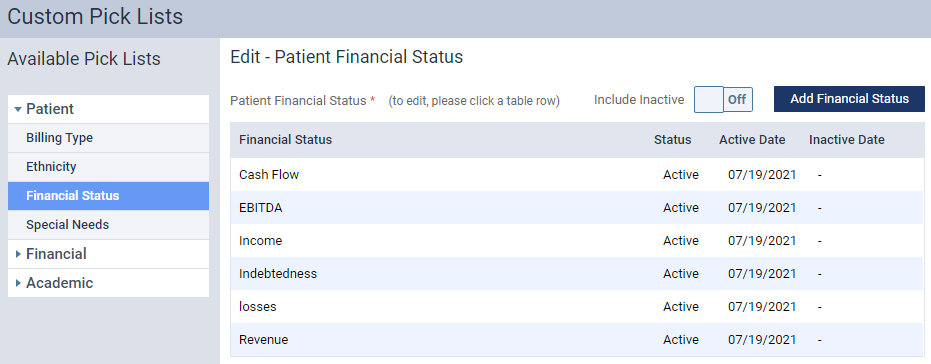
Each custom pick lists display the following columns:
-
Field Type - Displays the name of the list item. The name can be maximum of 40 characters.
Note: The column's header displays differently per new custom pick lists. For Ethnicity custom pick list, the column displays as Ethnicity. For Financial Status custom pick list, it displays as Financial Status. For Special Needs custom pick list, it displays as Special Needs.
-
Status - Displays the current status of the list items.
-
Active Date - Displays the calendar date when the list item was created.
-
Inactive Date - Displays the calendar date when the list item was deactivated. For active items, it displays as "-".
By default, these pick lists don't have any list items, and will require administrators to add them as necessary.
New power reports
We have added 2 (new) power reports (Home > Reports > Power Reporting): the Analysis Clinical Note Report Builder and Interactive Clinical Note Report Builder.

Administrators can use these reports to display a list of clinical notes with information on the notes, the patients, and its' associated providers. If necessary, you can use the reports to specifically generate a list of unsigned clinical notes. To generate a list of unsigned clinical notes, you need to set the Locked Date filter, which filters data by the date it was signed, accordingly:
-
Analysis Clinical Note report - set to "Not Available"
-
Interactive Clinical Note report - set to "is null"
Notes:
-
To filter the Interactive Clinical Note report by Is Draft, Has Provider Signature, Has Attending Signature, or Has Additional Signature, the filter must to set to "1" or "0".
-
In these reports, a Provider is the provider that is assigned to a clinical note as the note's provider.
Application of comments on patient complexity
Previously on evaluation forms (Settings > Evaluation > Evaluation Forms), the Comment Setup feature didn't apply to patient complexity, preventing evaluators from leaving any comments on patient complexity's conditions. Now, when the Comment Setup > Each question check box is selected, it's also applied to the patient complexity factors.

Comments
0 comments
Please sign in to leave a comment.