
Several new feature enhancements are included in the product update released in early July 2021. The major enhancements in this release include new ability to restrict and manage access to the text message feature, improved display of assigned evaluators on exported list of faculty evaluation requests, and enhanced login speed.
New ability to restrict and manage access to the text message feature
Previously, users could access all text messages between their office and patients' primary contacts as long as they had the Review inbox messages user role permission set. Now, access to text messages depend on your provider status and your security rights.
If you have the Review inbox messages user role permission set and you're a provider, you only have access to your patients' text messages. Specifically, patients that have you set as their primary provider. If you're not a provider, you don't have access to the feature.
To access all text messages, you need the (new) Review all patient messages user role permission set, regardless of your provider status. Also, your access affects the red circle on your User name menu, which displays the total number of unread text messages.
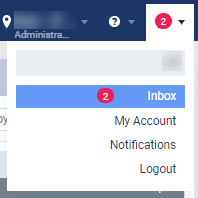
If you don't have access to text messages, the red circle doesn't display. If you only have access to your patients' text messages, the red circle only displays the total number of your unread messaged. If you have access to all text messages, it displays the total number of unread text messages at your office.
Improved display of assigned evaluators on exported list of faculty evaluation requests
We have made the following changes to exported lists of faculty evaluation requests (Academic > Faculty Evaluations):
-
The Evaluator column has been renamed to Evaluator Short Name.
-
We have added a (new) Evaluator Name column, which displays the full name of the assigned evaluators in the "Firstname Lastname" format.
Enhanced login speed
For an enhanced logging experience, we've made it faster to login.
Treatment plan cases changes their status whenever its' procedures are modified
Issue: When users edit a completed treatment plan case's procedure that is completed without changing its status, the associated treatment plan case updates to the Accepted or Pending Patient Consent status. Also, the edition is recorded in the treatment plan history as “Changed by Administrator: was deleted”.
Solution: Fixed so users can edit patients’ procedures properly as expected. Also, the action is recorded properly in the ledger, not the treatment plan history.
Appointments do not load properly on the Calendar when there are too many appointments
Issue: When an office has at least 2100 appointments within a week, the Calendar page does not load all appointment properly.
Solution: Fixed so the system loads properly regardless of the busy schedule.
Unable to remove completed procedures from unsent insurance claims
Issue: When users remove a completed procedure from an unsent insurance claim, the procedure may not be deleted from the claim as expected.
Solution: Fixed so completed procedures can be removed properly.
Claims unable to receive response from NEA due to incorrect status
Issue: When users submit an insurance with an attachment, the claim doesn't get a proper response from NEA because its status remains as NEAHold.
Solution: Fixed so status updates properly as expected.
Comments
0 comments
Please sign in to leave a comment.