
Several new feature enhancements are included in the product update released in early June 2021. The major enhancements in this release include improvements to evaluations and extension of quick-pick feature's character limit.
Improvements to evaluations
Several changes have been made to evaluations (Academic > Student Evaluations or Faculty Evaluations):
-
We have added a (new) patient complexity feature that allows users to apply bonus points when they work with patients with complicated conditions. Specifically, with age, calculus, and periodontitis. When student providers work with patients with these conditions, they are very likely to lose points. This new feature is a way for student providers to earn bonus points to make up for it.
Important: Although this feature is available for both demerit and pass/fail grading schemes, the feature only works for demerit grading schemes, as pass/fail doesn't grade by points.
Administrators can setup the feature on the (new) Patient Complexity tab on the Evaluation Setup page (Settings > Evaluation > Patient Complexity).
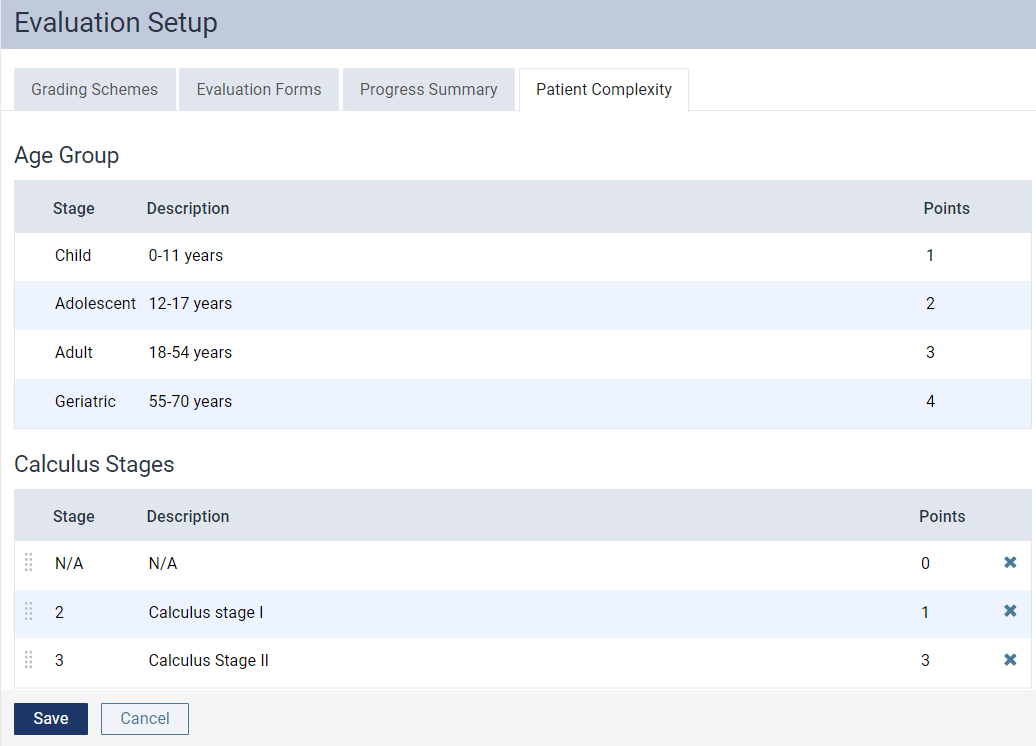
Each condition displays the following columns:
-
Stage - State of the condition.
-
Description - Description of a stage. The description displays as a tooltip of an
 icon when users are completing an evaluation request.
 -
Points - Number of bonus points the student provider will earn if they select this stage.
While the Stage column can't be edited, the Description and Points can be edited as desired.
Administrators can add or remove the patient complexity feature from new or existing evaluations forms by using the (new) Include Patient Complexity check box on the Evaluation Forms tab of the Evaluation Setup page.

Important: On new evaluation forms, the check box is selected by default.
Once set, the patient complexity displays on evaluation requests that uses the evaluation form for both student and faculty providers.

For student providers, the bonus points earned from their self-evaluations are only applied to their self-evaluation marks, not their final grade evaluation. Only bonus points from faculty providers' evaluation requests are applied to the final grade.
-
-
Previously, the
 column behaved as followed:
-
Display a blank if an evaluation request doesn't require a self-evaluation
-
Display the
icon if an evaluation request requires a self-evaluation
Now, we have added a (new)
 icon that only displays if an evaluation request requires a self-evaluation and the student provider hasn't completed it yet. Once completed, the icon displays.
To help differentiate between the 2 icons, we have added (new) tooltips that display when you hover over an icon. If you hover over the
icon, the Self Evaluation Completed tooltip displays. If you hover over the icon, the Self Evaluation Pending tooltip displays. -
-
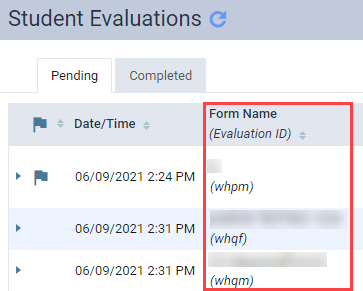
Evaluation requests have been updated to now display the evaluation form name with the evaluation ID in brackets. Specifically, in the following areas:
-
Faculty Evaluation page > Form Name column

-
Student Evaluation page > Form Name column
-
Request Competency Evaluation window > Multi-Visit Exam section > Continue a multi-visit evaluation option

Users can now identify evaluations from multi-visit evaluation requests by the evaluation ID.
-
Extension of quick-pick feature's character limit
Throughout axiUm Ascend, we have extended the quick-pick feature's character limit from 500 to 4000. Now, users can document a more detailed notes on a patient's health history on clinical notes.
The Analysis Procedure Tracking Report Builder doesn't work properly when dealing with multiple fields
Issue: When users generate the Analysis Procedure Tracking report with multiple fields, the report doesn't display data properly.
Solution: Fixed so it displays properly as expected.
Comments
1 comment
Is the self evaluation status included in the data export? This would be great to notify Faculty or the Student that an evaluation is pending.
Please sign in to leave a comment.