
Several new feature enhancements are included in the product update released in early March 2020. The major enhancements in this release include improvements to Electronic Prescriptions, Improvements on the Faculty Evaluations page, and more information on the Unsigned Clinical Notes page.
Improvements to Electronic Prescriptions
Important: Improvements to the Electronic Prescriptions (eRx) are implemented on March 15th at 9:00PM EST.
Several changes have been introduced to Electronic Prescriptions (eRx) (Patient > General > Prescriptions):
-
The functionality of the Effective Date field and the Today button in the Add Prescription section have been improved to better support mobile devices.

-
eRx now offers an integration through Appriss Health with a state's Prescription Drug Monitoring Program (PDMP).
Important: If interested in this service, please contact support for more information on how to get started.
-
When searching for obsolete medications, providers will be prompted to add a new one instead.
-
To prevent Chrome autofill, autocomplete is now disabled for most fields.
Improvements on the Faculty View Settings page
We have made several improvements to the Faculty View Settings page (Settings > Evaluations > Faculty View Settings):
-
The Restore Defaults button has been updated to now set a faculty provider's view settings to Assigned to me.
-
If a faculty provider's view settings is set to Assigned to me, the Apply to button is now enabled, and you can use it to set multiple faculty providers' view settings to Assigned to me.
Note: If the view setting was already set to Assigned to me before this release on March 13th, the Save Changes button display instead of the Apply to button. Once saved, the Apply to button displays.
More information on the Unsigned Clinical Notes page
The Unsigned Clinical Notes page (Home > Location > Overview) now displays the names of the note's provider, attending provider, and additional provider.
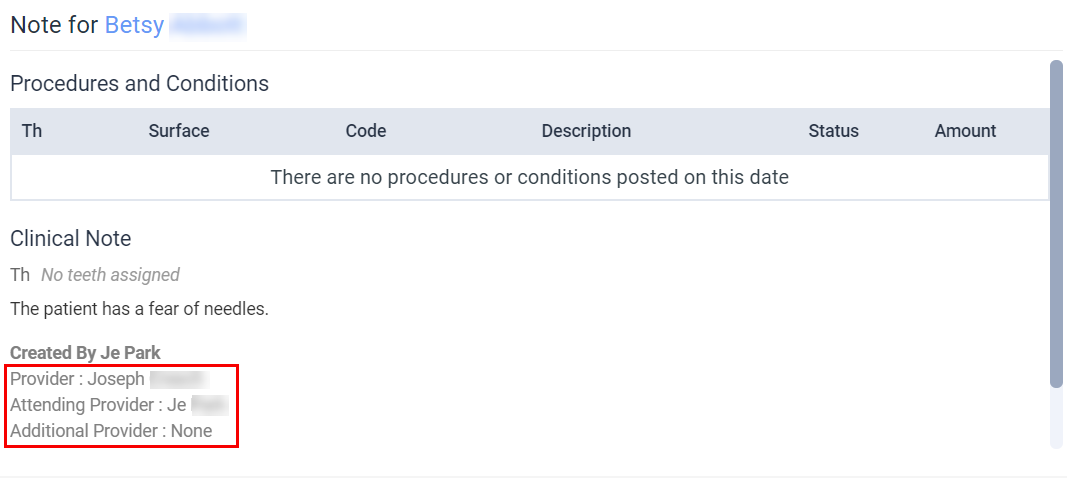
If there is no attending or additional provider associated with the note, the field displays as None.
Reordering prescriptions with effective dates don't save properly
Issue: Within electronic prescriptions integration, when users change a pharmacy while reordering a prescription with an effective date, the written prescription does not save the new pharmacy.
Solution: Fixed so it saves properly.
EPCS prescription log
Issue: When users prescribe an electronic prescription, the prescription log within the electronic prescriptions integration contains two records of the EPCSSigned status.
Solution: Fixed so it no longer contains two records.
Users cannot select some locations on the Aged Receivables report
Issue: When users attempt to filter the Aged Receivables report to some locations, they cannot select the location.
Solution: Fixed so the report filters properly.
Comments
0 comments
Please sign in to leave a comment.