
Several new feature enhancements are included in the product update released in early-August 2019. The major enhancements in this release include a new Phase field for treatment planning cases, the ability to export the deposit slip report, and updated wording for competency evaluations.
Phase added to Treatment Planning Cases
A (new) Phase field has been added to treatment planning cases to help classify various phases of work and to discern between treatments that are urgent and those that are maintenance. The available options include the following:
-
None
-
Urgent
-
Control
-
Re-Evaluation
-
Definitive
-
Maintenance
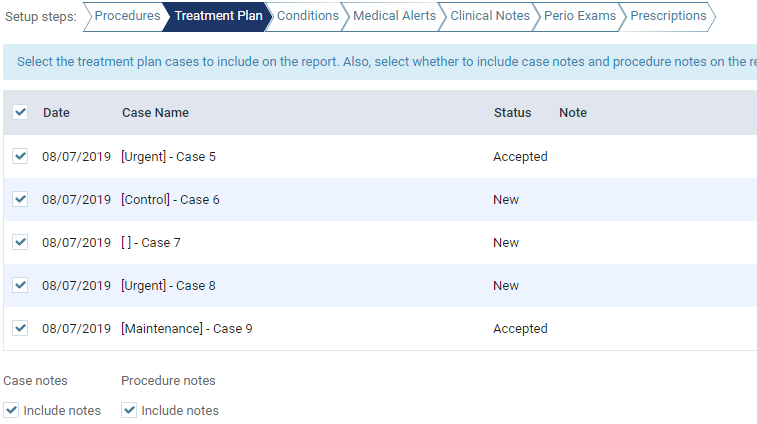
Once set, the (new) Phase displays within square brackets before the case name.
Example: [Urgent] - Case 5
When creating a new case, the Create a case window allows you to select a (new) Phase and enter a Name for the treatment plan case.

Tip: To rename a case, under Draft, select a case, clicktap the Edit ( ) icon, edit the case name as necessary, and clicktap away or press Enter to save.
The (new) Phase field displays throughout axiUm Ascend anywhere the name of the treatment plan displays, allowing you to identify treatment plans, and their phase, more easily.
Treatment planning case list:

Requesting approval:

Treatment Plan and Appointments widgets:

Previewing and printing treatment plans:

Selecting and printing clinical reports:
Ability to export Deposit Slip report to Excel
A (new) Export button has been added to the Deposit Slip Filter window which allows you to export the deposit slip report results into an Excel spreadsheet (.xlsx) file.

The exported file contains the following columns:
-
Date
-
Location
-
Name
-
Bank
-
Check #
-
Amount
-
Payment Type
Note: The file is saved to your Downloads folder and is named deposit slip report.xlsx. If a file with the same names exists in that location, the new file will have a bracketed number appended to it.
Example: deposit slip report (1).xlsx
New wording for competency evaluations
The wording, Competency Exam has been replaced with Competency Evaluation throughout axiUm Ascend to be consistent with other evaluation types.
Comments
0 comments
Please sign in to leave a comment.