
Several new feature enhancements are included in the product update released in late June 2019. The major enhancements in this release include several improvements to treatment planning including new approval functionality and more control around status changes, updates to when evaluation requests are generated and eRx notifications display, updates to how patient notes display, and the ability to view billing statements from the Document Manager.
New approval functionality added to treatment planning
The treatment planning workflow has been updated.
Users that cannot change treatment plan statuses now must request approval from a faculty member to move a treatment plan from Draft status to Pending Faculty Approval status.
To request approval for a treatment plan, you can click the new Request Approval button and select a drafted treatment plan. Plans that you have requested approval for automatically change to the Pending Faculty Approval status until they are approved by a faculty member.

When you receive approval for the treatment plan, it moves from Pending Faculty Approval status to Pending Patient Consent status.
Improvements to treatment plans
Several changes have been made to treatment plans.
-
Faculty must log in to change treatment plan statuses from student workstations.
When a student without the Change Treatment Plan case status permission attempts to change a treatment plan status using the Status drop-down list, a Change Case Status window now displays. A supervising faculty member with the Change Treatment Plan case status permission must enter their username and password to allow the treatment plan status to be updated.

Note: This applies if students attempt to change a treatment plan status when viewing treatment plans or previewing treatment plans.
Students can still preview and print treatment plans without being prompted to log in another user, regardless of their permissions.
Note: The Audit Log identifies the student as the user that updated the treatment plan status.
-
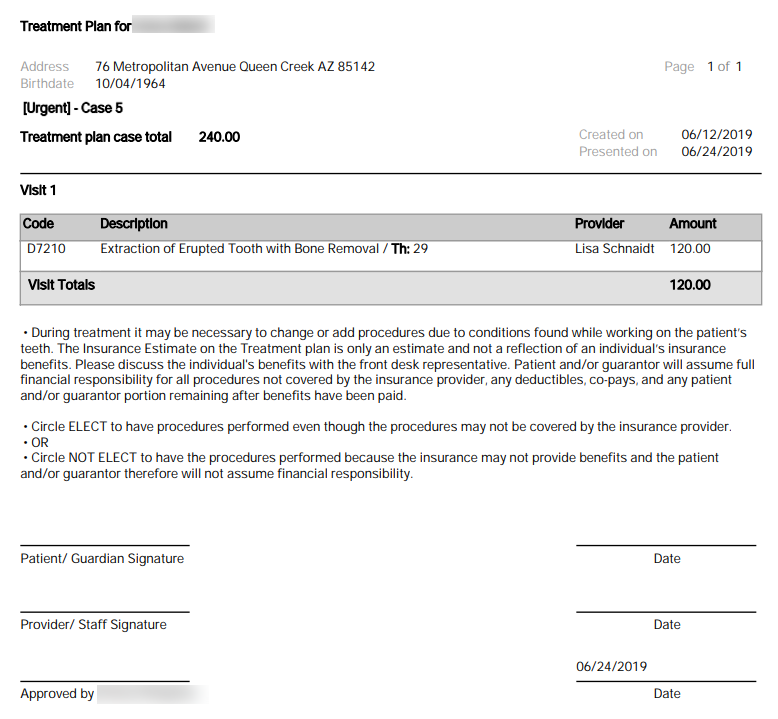
Treatment plans display the approval user.
When printed, treatment plans (Patient > Clinical > Treatment Planner) that are set to Pending Patient Consent status now display the last user that approved the plan and the date the plan was approved.
Note: The approval user is the user that changed the status to Pending Patient Consent status. If the user has a signature stored on file, the signature is auto-populated. If the user does not have a signature stored on file, the signature field is blank.
-
Additional audit logging for treatment plans.
The Audit Log now logs treatment plan status transitions. Each one includes the treatment plan name, the status it changed from and the status it changed to.
Note: Transitions to Completed status are not captured in the Audit Log because the workflow is automatic; treatment plans move to Completed status automatically when all the procedures in the treatment plan are set as completed.
Evaluation requests generated at checkout time
Evaluation requests are now generated when the patient is checked out instead of when the patient is seated. This helps ensure that the request is generated when the related items have been completed and are ready for evaluation.
Note: Evaluation requests are now generated for all appointments, even if there are no procedures to evaluate. If there are no procedures, faculty may choose to evaluate the student's interactions with the patient.
When the patient is checked out, the reminder message for the student to complete their self evaluation displays at the top of the screen and includes a hyperlink to the Student Evaluations page.
Update to electronic prescription notifications
axiUm Ascend displays an notifications indicator to faculty users when a student provider has completed work in eRx on their behalf. To help faculty members manage their notifications more effectively and integrate more seamlessly with their workflow, axiUm Ascend now uses a longer periodic interval before checking for new notifications.
Update to patient notes
Patient notes (Patient > General > Patient Information > Notes) have been updated to display more effectively.
Entered By <user displayname> now displays at the top of a note, with Last Modified by <user displayname> at <date and time> directly beneath, and the body of the note displays below.

Ability to view billing statements from Document Manager
You can now access a patient's most recent billing statement from the Document Manager (Patient > General > Document Manager).
axiUm Ascend checks once a day for new statements to upload into the Document Manager based on a patient's chart number. The name of the uploaded file displays as Billing-Statement<date uploaded>-.pdf and is labelled with a Billing Statement tag.
Example: Billing-Statement-2019-06-28.pdf
Comments
0 comments
Please sign in to leave a comment.