
A new feature enhancement is included in the product update released in early March 2019. The major enhancement in this release is an Evaluations module that allows you assess student providers on the treatment they perform during an appointment.
New Evaluations functionality
A (new) Evaluations module is now available that allows you to complete self evaluations or faculty evaluations on the treatment performed by a provider during an appointment. There are two types of evaluations: session and competency.
If a provider is set to require evaluations, a session evaluation is generated automatically when a patient is seated for the appointment. Providers that require evaluations can also request a competency exam when they require one. The Evaluations module also allows you to cancel a competency exam request, if requested by mistake.
Once an evaluation request has been generated (automatically or manually), you can begin and complete the evaluation when it is most convenient for your schedule. This may be soon after the provider seats the patient for their appointment or when a student provider has already completed treatment(s) on the patient. You can also save your progress and return to an evaluation throughout the appointment.
If the module is enabled, a (new) Academic menu displays from the top menu bar next to the Settings menu. Depending on your role, Student Evaluations or Faculty Evaluations may display from the Academic menu. You can select Student Evaluations or Faculty Evaluations to access and complete your applicable evaluations.

Note: Whether Student Evaluations or Faculty Evaluations displays depends on if you are a student provider or a faculty member. In some cases, a user may have access to both.
Additionally, under the Settings menu, a new Evaluation column displays. If you have the correct permissions, you can use this to access the Grading Schemes and Evaluation Forms pages to create and edit the grading schemes and forms that are used in the evaluations.
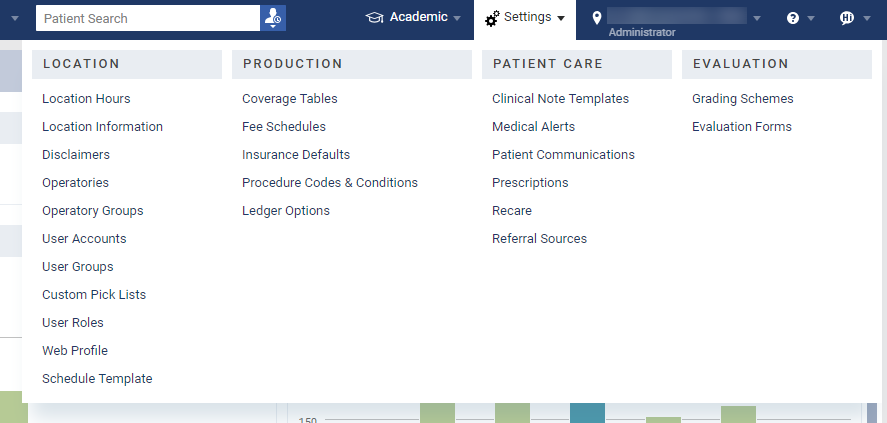
Note: Only users with the Manage Academic Evaluations permission can perform evaluation setup.
On the User Roles page, a new Academic Evaluations section has been added. This includes the new Evaluate other user's Evaluation Requests, Manage Academic Evaluations, and Requires Evaluation permissions.
Notes:
-
Only users with the Evaluate other user's Evaluation Requests permission can access the Faculty Evaluations page to complete faculty evaluations.
-
Only users with the Requires Evaluation permission can access the Student Evaluations page to complete self evaluations.
-
Any user with permissions that allow them to change status on an appointment can by default create or modify the evaluation requests that occur when a patient is seated.
Important: To work with the Evaluations module, it must be enabled for your institution. You must contact the Support team to enable and begin using the Evaluations module.
Error displays when copying a fee schedule
Issue: When a user tries to copy an existing fee schedule to create a new fee schedule, an error displays and the fee schedule is not copied.
Solution: Fixed so that users can copy existing fee schedules to create new schedules as expected.
Edit Payment window doesn't display when applying credits that exceed the patient portion
Issue: If a user tries to apply credits, but the credit amount is greater than the remaining estimated patient portion, the Edit Payment window does not display.
Solution: Fixed so that the Edit Payment window displays as expected and allows the user to re-allocate the payment.
Inconsistent behavior occurs when Show only business days toggle is used
Issue: When a user opens the Calendar page and sets the View menu > Show only business days toggle to On, the Calendar displays days and operatories incorrectly. This behavior includes displaying non-business days, displaying operatories multiple times, displaying appointments on the wrong day, and not displaying some operatories.
Solution: Fixed so that the Calendar displays days and operatories correctly when the Show only business days toggle is set to On.
Comments
1 comment
Can we update the component about the session evaluation being generated when the patient is checked out, not when seated?
"If a provider is set to require evaluations, a session evaluation is generated automatically when a patient is seated for the appointment."
Please sign in to leave a comment.