
Several feature enhancements are included in the product update released in late August 2018. The major enhancements in this release include a new link to the patient Ledger; a new filter for the Day Sheet report; updates to the Routing Panel that include an Appointment Tasks section and a modified way to display guarantor and primary contact information; and updates to the Online Booking page that include a name change to Schedule Template and a graphical user interface.
New link to the patient Ledger
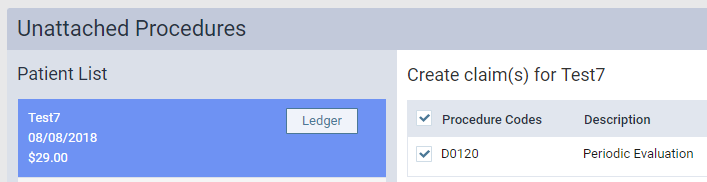
You can now access the patient Ledger via a new link on two pages. You can access the link from two places:
-
The Unattached Procedures widget (Home > Location > Overview > Unattached Procedures).
-
The Create Claims page (Home > Insurance > Create Claims)
New filter for the Day Sheet report
When using the Day Sheet report (Home > Reports > Day Sheet), the Date Range drop-down list has a new date option. You can now select Last Month to include all transactions from the start to the end of the previous month.

Updates to the Routing Panel
The Routing Panel now includes an Appointment Tasks section in the patient appointment card.

These listed tasks serve as reminders to the office staff to complete important tasks prior to the patient leaving the office. Possible tasks include:
-
Scheduling the next recare appointment for the patient.
-
Ensuring you have phone and email entries for the patient’s primary contact.
The task to add contact information is only present under certain statuses and when the information is missing.
Note: The ability to add new recare is always present.
Each task has a drop-down arrow. You must click the arrow to open and complete the task. A green check mark icon marks completed tasks.
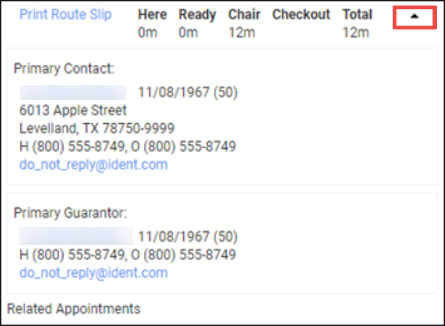
Additionally, guarantor and primary contact information are now at the bottom of the patient appointment card. You can click the expand arrow to display the guarantor and primary contact information.
Online Booking improvements
The Online Booking page has been renamed to Schedule Template to better describe its functionality and the online booking availability configurator has been changed from a text-based interface to a graphical user interface.
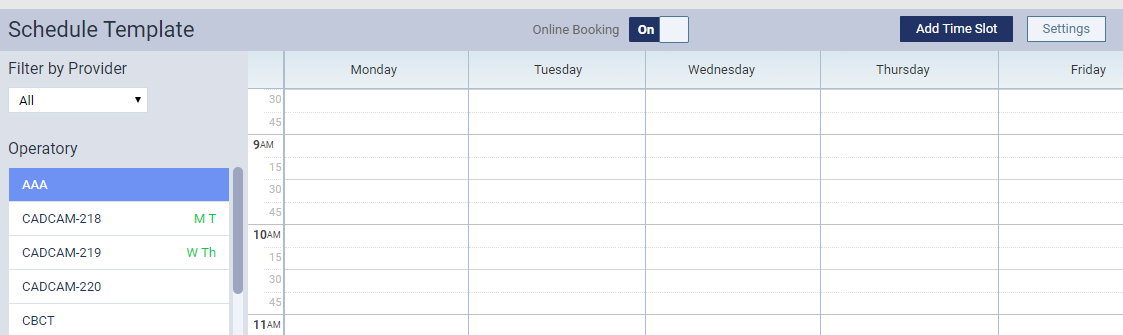
The interface resembles the Calendar, and you can use it to build Online Booking time blocks. Each block can be assigned a custom title and color, and multiple providers can be assigned within the block.

Once you’ve created a time block, you can click the Copy time slot icon to copy and paste the block into another part of the template.
Note: Time blocks cannot overlap.

The Schedule Template is for a week and is natively recurring.
Example: If you build something for Monday, it occurs every Monday.
Additionally, the Calendar View menu now includes a toggle to view schedule template blocks within the Calendar. The blocks display in the Operatory view.

Improved general usability
For providers, the Unsigned Clinical Notes page (Home > Location > Overview > Unsigned Clinical Notes) is now limited to 100 notes and displays pagination if more than 100 are present. This allows them to overcome performance issues if providers have excessive numbers of unsigned clinical notes.
Note: If fewer than 100 notes are in the unsigned list, no pagination is shown.

The Insurance Eligibility page now requires fewer clicks for your day-to-day work. You can click the appropriate verification button to move patients into tabs or click the Eligible button to update the verified date for patients.

The patient bar quick links have been modified to remove the Insurance Information link and add an Appointments link.
Note: If your practice does not use the Imaging module, a Patient Notes link shows instead.
Improved Reports functionality
Under Settings > Locations > User Roles, the Generate Reports right has been removed from the list of access rights because it is not used by the system.
The Day Sheet can now only be run by one user at a time per location. Any user that attempts to run a Day Sheet report while one is currently running will see a warning message and must wait until the report is complete.
Comments
0 comments
Please sign in to leave a comment.