
New feature enhancements and bug fixes are included in the product update released in late February 2018. The major enhancements in this release include new functionality when you enter payments, and improvements when editing medical alerts, viewing edited appointments from the Calendar, and allocating patient payments.
New payment category is available
When categorizing payments or attaching them to a patient's ledger to reconcile the accounts, you now have an additional payment category called Grant Payment.
If you select Grant Payment to enter a patient payment, a Check# field is available to enter a reference number.
Note: Grant payments are available for reporting.
Example: A Deposit Slip.

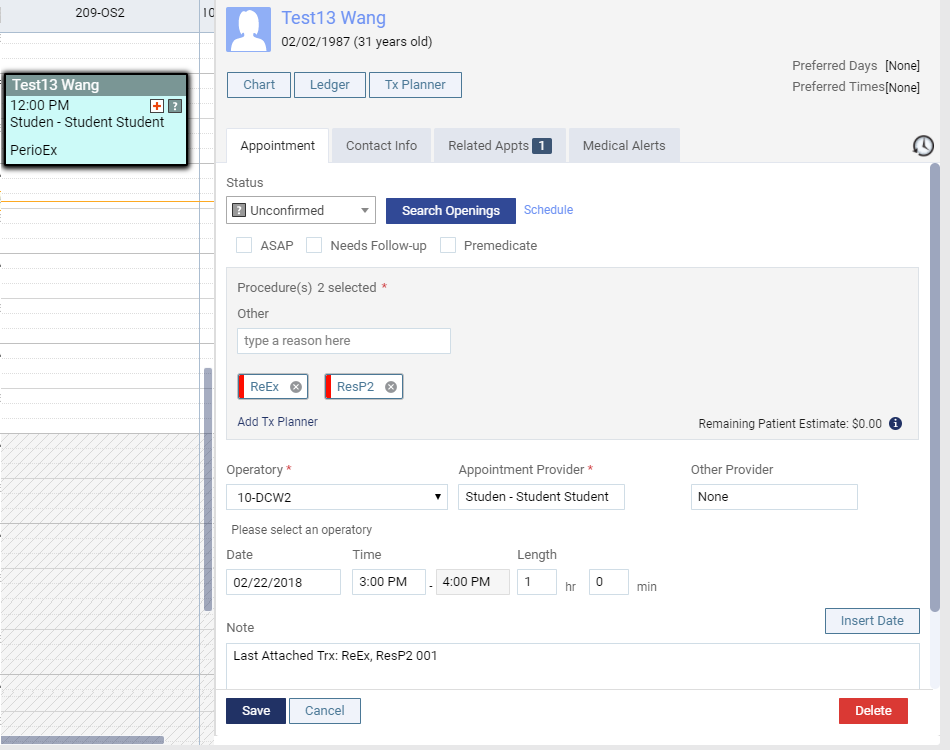
Appointments display the last removed treatments
When you open appointments, you can now view in the Note field the last treatment and related office codes that were removed from the appointment. This gives appointment schedulers context about an appointment if they follow up with providers about appointment history.
Note field added to medical alerts
The Edit Medical Alert window now displays a Note field which you can use to enter additional information about the medical alert. If entered, the contents of the Note field display in the Medical Alert list.

Improved payment allocations procedure
The payment allocation procedure has been improved. Under Unapplied Credits, you can click Apply Credits to auto-open the Enter Payment window and display the first patient payment that is not fully applied to treatments.

The Enter Payment window displays a (new) Incl. All Outstanding Txs. check box. You can select the check box to display treatments that have a guarantor estimate of $0, but are not fully paid off.

Notes:
-
Once you select or deselect the Incl. All Outstanding Txs. check box, the setting is saved until you change the setting or close your session.
-
If there are multiple unallocated payments, the Save button is replaced with a Save and Open Next Payment button which opens the next payment that is not fully applied to treatments.
The Progress Notes > Additional Provider field updates incorrectly
Issue: When users open an edited Progress Note, the Additional Provider field displays the primary provider instead of N/A.
Solution: Fixed so that an edited Progress Note displays N/A in the Additional Provider field unless an additional provider has been set.
Comments
0 comments
Please sign in to leave a comment.