
Several new feature enhancements and bug fixes are included in the product update released in early-October 2023. The major enhancements in this release include the following:
-
Evaluations
-
Imaging
-
Add-On Integrations
Important: Enhancements from this release will be available in PROD on October 07, 2023.
Evaluations
Competency forms support demerit grading
Users can now create competency evaluations that use demerit grading. When creating evaluation forms from the Evaluation Setup page (Settings > Academic > Evaluation Forms), users can now set the Evaluation Type field to Competency and set the Grading Scheme field to Demerit Grading.

Ability to modify demerit grading logic
When creating evaluation forms from the Evaluation Setup page (Settings > Academic > Evaluation Forms), a (new) Calculation Method field now displays when users set the Grading Scheme field to Demerit Grading. This field controls how Ascend Academic calculates grades for competency and sessional forms that have multiple evaluators.
-
If set to Average Per Question, Ascend Academic calculates the average of the evaluator scores for each question.
-
If set to Average Per Evaluator, Ascend Academic calculates the average of the evaluator scores for each form.
Note: This entry is the default value before and after the upgrade. Forms that use demerit grading and are not modified after the upgrade will have no change to their usual logic.
-
If set to Latest Answer Per Question, Ascend Academic uses the last evaluator’s answer for each question.
Important: Regardless of which option is used, the pass/fail grade for the evaluation is determined by the total calculated score when compared to the passing points. Additionally, the evaluation is failed if an evaluator gives a failing grade to any of the critical questions.

Note: This logic also applies to evaluations that were in progress before the upgrade.
Ability to customize demerit grading schemes
When creating grading schemes from the Evaluation Setup page (Settings > Academic > Grading Schemes), users can now define grade ranges. This includes the grade name, description, and corresponding demerit value.
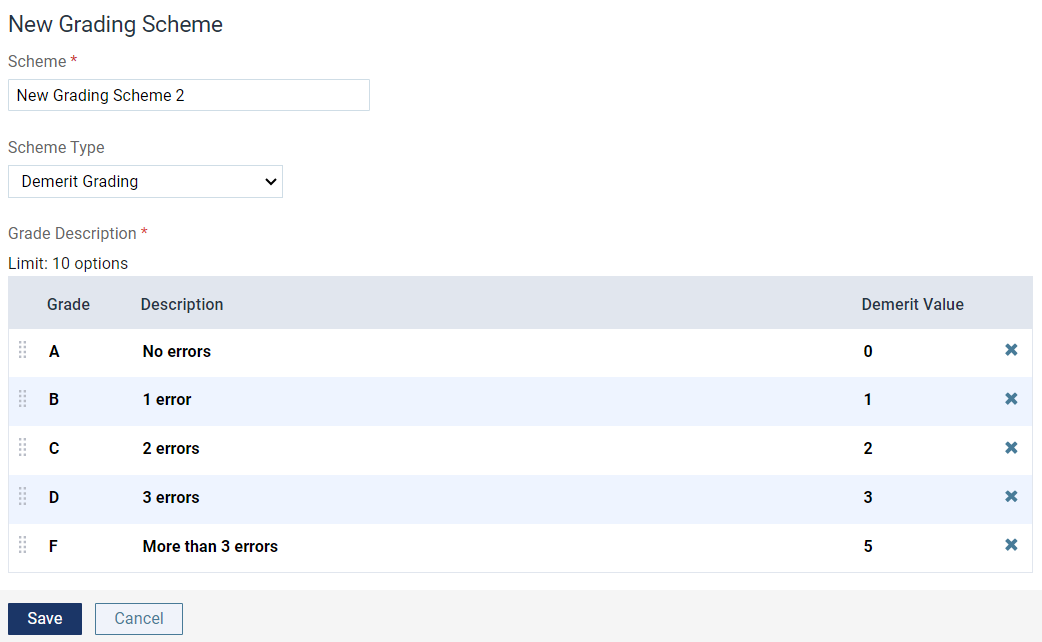
Notes:
-
Users can define a maximum of 10 grades per demerit grade scheme.
-
Each grade name can be a maximum of five characters.
Improvements to multi-visit evaluation usability
We have made several changes to multi-visit competency evaluations to improve usability:
-
When an evaluator wants to submit an in-process competency evaluation as a multi-visit evaluation, the pass/fail information warning has been removed because it is not applicable at this time.
Note: The pass/fail information warning still displays when a faculty member completes and submits the multi-visit evaluation.
-
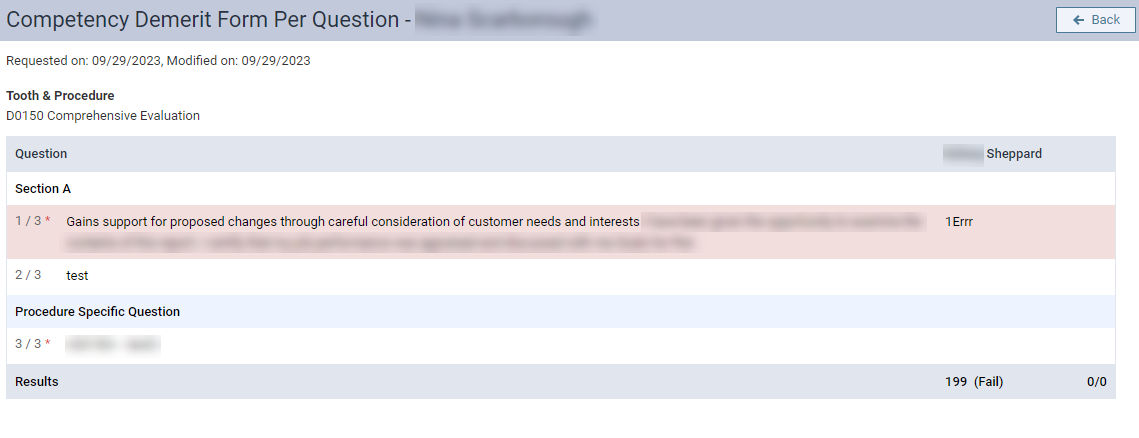
When a faculty member works on a multi-visit competency evaluation with demerit grading, the evaluation now displays dynamically the current total score as the faculty member performs the evaluation.
Note: If applicable, the total score and (Pass) / (Fail) status for the submitted self evaluation also displays.
-
Once completed, a user can view the competency evaluation and see the (Pass) / (Fail) status for each evaluation portion, and the overall Pass / Fail grade at the top of the evaluation.
Expanded ability to delete student evaluations
When necessary, faculty users can now delete a completed student evaluation from the Faculty Evaluations page (Academic > Faculty Evaluations) and the Student Evaluation Search page > Completed tab (Academic > Evaluation Search) in addition to the Academic Progress page > Student Performance tab.
Note: Users must have the Delete a Completed Evaluation Request security right.
When working on the Faculty Evaluations page or the Student Evaluation Search page, users can click a (new) ellipsis button and select Delete or click View to open the form and click a (new) Delete button.
The Faculty Evaluations page:
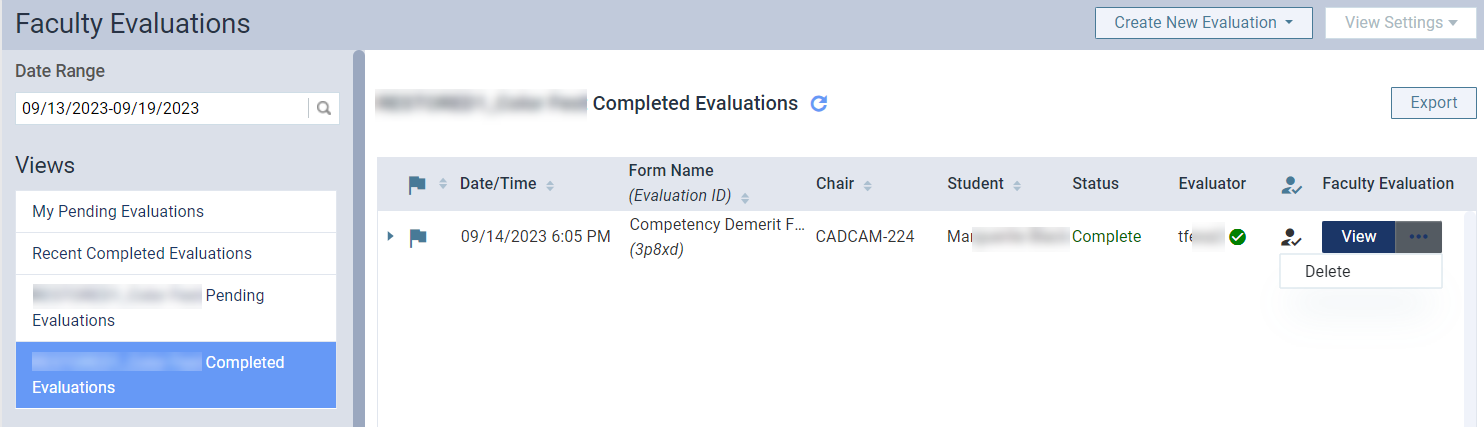
The Student Evaluation Search page:

Open evaluation form:

Note: The user, date/time, student name, evaluation form name, evaluation ID, and evaluator name are all tracked in the evaluation audit log.
Evaluations consultation service available
Ascend Academic Support now offers a service to help institutions convert to paperless evaluations within Ascend Academic. During consultation, Support can assess your institution’s needs, and determine whether they must build new evaluation forms or can import starter form templates into your organization and help make any necessary modifications.
Note: Imported form templates also include any necessary grading schemes.
Important: All assessments and imports/exports will be performed by Support. For more information on this service, contact Ascend Academic Support.
Imaging
RCI updated to version 107.1
The RCI version has been updated to 107.1.
Important: Users must update their Acquisition Agent.
Add-On Integrations
Ascend Voice
Ascend Academic now offers the ability to chart perio exams and dictate clinical notes using Ascend Voice. This functionality requires the purchase of Ascend Voice licenses and the installation of a Bola AI browser extension.
Note: This browser extension is available for Chrome browsers only.
Bola AI dental software provides a voice-only, touchless charting solution powered by artificial intelligence that helps increase efficiency in the clinic. Ideal for perio charting and entering clinical notes, Bola AI is easy to use, offers flexibility to suit your workflows and vocabulary, and delivers consistent, high accuracy results.
For more information about Ascend Voice, please contact Ascend Academic Support.
Bug Fixes
Error may display when adding users and leaders to user groups
Issue: An error may display when users attempt to add users and/or leaders to a user group.
Solution: Fixed so that users can add users and/or leaders to a user group, as expected.
Unread message indicator may not display correctly
Issue: The unread message indicator may not display on the User Name menu and the Inbox page > Message tab when users receive text messages from patients.
Solution: Fixed so that the indicator displays correctly when users receive text messages from patients, as expected.
Comments
0 comments
Please sign in to leave a comment.