
Several new feature enhancements are included in the product update released in early June 2023. The major enhancements in this release include the following:
-
Patient Information
-
Insurance
-
Reporting
Important: Enhancements from this release will be available in PROD on June 03, 2023.
Patient Information
New Ledger Report
Users can now access a (new) Ledger Report that allows them to generate a list of all the procedures completed and payments made during a specific time period.
Note: The report includes ADA procedure codes in case the patient’s health plan requires that information.
Tip: This is useful if your institution often gets requests from patients at the beginning of a new year asking for the procedures completed and payments made during the previous year.
When the report is accessed (Patient > Financial > Ledger Report), the (new) Ledger Report window displays. From here, users can set the filters to select a Date Range and the Report Type that is the selected patient or the patient’s guarantor. When ready, they can clicktap Print to open a new browser tab with a PDF print preview.

The print preview allows users to print the report and hand it to the patient and/or download and save the file so they can upload it to the Document Manager or email it to the patient.
Note: The highlights in the image below indicate the types of transactions that the report might include.
Important: The Ledger Report does not get added to the Patient Connection.

Insurance
New note after merging carriers
When users merge two insurance carriers (Home > Insurance > Carriers), a note is now added to the Claim Detail window > Status/Notes tab for each affected claim to help track the history of the claim. The note indicates that the claim was moved from the old Payer ID number to the new Payer ID number and the date that the carriers were merged.

Reporting
Improvements to Clinical Note Tasks Report
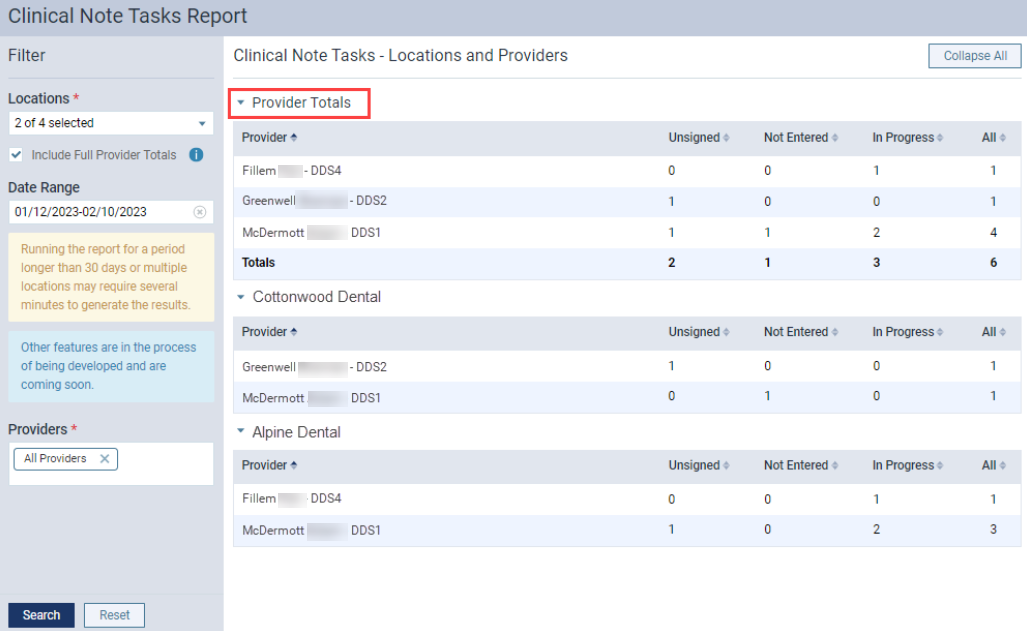
We have made several changes to the Clinical Note Tasks Report. When working with the Clinical Note Tasks Report (Home > Reports > Clinical Note Tasks), the following functionality is now available:
-
Users can now select a (new) Include Full Provider Totals check box to display a (new) Provider Totals section at the top of the report for all selected locations. The Provider Totals section includes a breakdown of outstanding clinical note tasks for each provider and a grand total of outstanding clinical note tasks for the selected locations within your organization.
Note: By default, the Include Full Provider Totals check box is deselected.
-
A (new) Reset button allows users to clear their selections and return to default settings without exiting the page.
-
Users can now view inactive providers in the report.
Bug Fixes
There are no bug fixes included in release 405-0.
Comments
0 comments
Please sign in to leave a comment.