
Several new feature enhancements are included in the product update released in early February 2021. The major enhancements in this release include improvements to security rights.
Improvements to security rights
Several changes have been made to security rights (Settings > Location > User Roles):
-
We have added a (new) Assign an evaluator to an Evaluation Request user role permission. It allows users to assign new faculty providers to an existing evaluation with InProgress status on the Faculty Evaluations page (Academic > Faculty Evaluations). This allows you to re-assign evaluations in case an assigned evaluator can no longer submit their evaluation, possibly due to personal emergencies or they no longer working at the clinic.
To re-assign an evaluation request, clicktap the corresponding
 button and select the (new) Assign Evaluator button.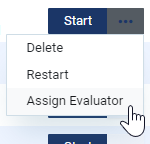
Important: If the evaluation request has the required number of submited evaluations from faculty providers, the button doesn't display.
The Assign Evaluator(s) to Evaluation Request window displays.

Note: All evaluators currently assigned to the evaluation request display on the window as disabled fields.
To add faculty provider(s) to the evaluation request, clicktap the Add Evaluator button to generate a new field. You can use the field to search and select the desired faculty provider.
Notes:
-
Once the total number of assigned evaluators reach the allowed maximum total, which is double the required evaluators for the evaluation form, the Add Evaluator button is disabled.
Example: If a form requires 2 evaluators, the evaluation request can have maximum 4 assigned evaluators. As soon as 4 evaluators are listed on the window, including the evaluators already assigned to the evaluation, the button becomes inactive.
-
The availability of the Assign an evaluator to an Evaluation Request user role permission is dependent on the Evaluate Other Users' Evaluation Request user role permission.
-
-
We have added a (new) View Other Evaluator's Unsubmitted Graders user role permission. Once set, faculty providers can now view other evaluators' unsubmitted comments and grades before they submit their own evaluations (Academic > Faculty Evaluations). This is ideal for evaluation forms with multiple evaluators, as faculty providers can discuss and read other's comments on students' grades before submission.
Note: The availability of the new user role permission is dependent on the Evaluate Other Users' Evaluation Requests user role permission.
-
We have added a (new) Edit completed procedure Bill to insurance user role permission. It allows users to manage the Bill to Insurance toggle switch on completed procedures in all areas of axiUm Ascend, without giving them access to other clinical information. This user role permission is ideal for users that only manages ledgers and insurance.
This permission is split from the Edit completed procedures user role permission, which is now dependent on the new user role permission.
-
The availability of the Delete Completed Evaluation Request user role permission is now dependent on the Evaluate Other Users' Evaluation Requests user role permission. If the Evaluate Other Users' Evaluation Requests user role permission isn't set, the Delete Completed Evaluation Request user role permission is disabled on the User Roles page.
axiUm Ascend may not save when users edit clinical notes
Issue: When users add an additional provider to a clinical note and save, axiUm Ascend may not save properly.
Solution: Fixed so it saves as expected.
axiUm Ascend may not save when users edit an existing operatory group
Issue: When users edit an existing operatory group and save, axiUm Ascend may not save properly.
Solution: Fixed so it saves as expected.
Comments
0 comments
Please sign in to leave a comment.