
You can re-schedule an existing appointment.
To reschedule an appointment
How to get there
-
From the Schedule menu, select Calendar.
The Calendar page displays.
-
On the Calendar page, clicktap an appointment to open the Appointment Information panel.
-
Perform one of the following:
-
Select an open time slot.
-
If necessary, navigate to a different date.
Tip: You can also change the schedule's view settings.
-
Select an open time slot.
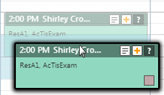
Note: The date, time, operatory, and provider all may change depending on the schedule's view settings and where you drag the appointment.
-
On the Appointment Information panel, clicktap Save.
The Appointment Information panel closes and the appointment card displays on the new time slot.
Note: If there are conflicts with the new time slot, such as with the location's hours and the appointment provider's schedule, the Select Time Slot window displays.

-
If prompted, select a time slot from the list of suggestions that does not have any conflicts or keep the new time slot and clicktap Save.
-
-
Use the Schedule link.
-
ClickTap the Schedule link.

-
If necessary, navigate to a different date.
Tip: You can also change the schedule's view settings.
-
Select an open time slot.
-
On the Appointment Information panel, clicktap Save.
The Appointment Information panel closes and the appointment card displays on the new time slot.
Note: If there are conflicts with the new time slot, such as with the location's hours and the appointment provider's schedule, the Select Time Slot window displays.
-
If prompted, select a time slot from the list of suggestions that does not have any conflicts or keep the new time slot and clicktap Save.
-
-
Search for another opening.
-
ClickTap Search Openings.

The Search for Openings page displays.
-
Search for an available appointment spot.
Note: The Patient Search, Appointment Duration, Appointment Provider, and Operatory filter fields auto-populate from the existing appointment.
-
Under the Time column, select a blue time slot that matches your search criteria to re-open the Calendar page.

The appointment displays in the selected time slot.
-
ClickTap Save to confirm the changes.
-
-
Comments
0 comments
Please sign in to leave a comment.