
An appointment request is a request to book an appointment, which is submitted by a user without the ability to manage appointments. Once approved, the appointment is officially booked.
You can approve an appointment request from two locations: the Appointment Requests and the Calendar page.
Note: You can only approve appointment requests if you have the Manage Appointments security right.
To approve an appointment request
How to get there
-
From the Schedule menu, clicktap Appointment Requests.
The Appointment Requests page displays.
How to get there
-
From the Schedule menu, clicktap Calendar.
The Calendar page displays.
-
Complete one of the following:
-
On the Appointment Requests page, select an appointment request with a Pending status.
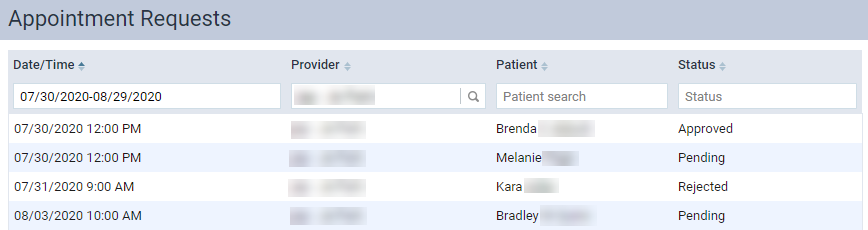
Note: The page displays a list of pending, approved, and rejected appointment requests with appointment dates within the next 30 days.
-
On the Calendar page, select an appointment request.

Note: Appointment requests display on the Calendar page with a cross-hatching background.
The appointment request's Appointment Information panel displays.
-
-
Confirm the appointment information is correct.
-
(Optional) Modify the appointment request by adding additional information or correcting incorrect information.
-
ClickTap Accept.
Comments
1 comment
Step 4 should read Approve, instead of Accept.
Please sign in to leave a comment.