
New feature enhancements and bug fixes are included in the product update released in December 2017. The major enhancements in this release include new functionality when you add procedures and clinical notes and improvements when viewing appointments from the Calendar.
Additional Provider field defaults to the logged in provider
When logged in providers add clinical notes, the Additional Provider field now defaults to the current provider.
Notes:
-
When adding procedures from an appointment, the Provider field still defaults to the appointment provider.
-
When adding procedures from the Ledger page, the Provider field still defaults to the primary provider.
Provider field defaults to the logged in provider
When logged in providers add procedures or conditions from the patient's Chart, the Provider field now defaults to the current provider instead of the patient's primary provider.
Notes:
-
When adding procedures from an appointment, the Provider field still defaults to the appointment provider.
-
When adding procedures from the Ledger page, the Provider field still defaults to the primary provider.
Increased Clinical Note window size
The Add Clinical Note window is now wider.
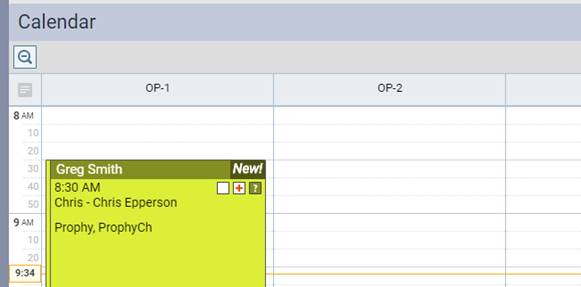
Provider name displays on the appointment in the Calendar
The provider’s name now displays on the appointment in the Calendar.
If the Chart page does not load fully, users cannot add a procedure and receive an error message
Issue: When trying to add a procedure, the Chart page sometimes doesn’t load fully, and users receive a Cannot be null error message when they click the Add Procedure button.
Solution: Fixed so that the Chart page loads fully and the Add Procedure window opens properly.
axiUm Ascend sometimes freezes when opening the patient prescriptions
Issue: When trying to add or refill a prescription for a patient, the axiUm Ascend sometimes freezes or takes a long time to open the prescription.
Solution: Fixed so that the prescription opens smoothly.
axiUm Ascend sometimes freezes when opening Users drop-down lists
Issue: When trying to open and scroll down a User drop-down list, axiUm Ascend sometimes freezes.
Solution: Fixed so that User drop-down lists open and scroll smoothly.
Comments
0 comments
Please sign in to leave a comment.