
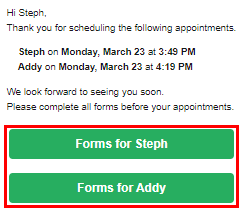
Patients can complete their patient forms online before or during their visit. Forms are available in the online portal, which can be accessed using the button or link included in their appointment reminder. The patient can also access their portal on a practice-owned mobile device.
Note: Buttons display for email appointment reminders, and links display for text appointment reminders.
Important: The Web address for a patient's online portal is unique to a given patient. Each patient must open the online portal by using the link or button that is specific to their record.
To complete a patient form
-
The patient clickstaps the applicable button on their email appointment reminder or the applicable link on their text appointment reminder to open their online portal.
Email appointment reminder
Text appointment reminder

-
The patient signs in, enters their personal information in the Family name and Date of birth fields, and clickstaps SIGN IN.

If this is the patient's first time using the portal, the Terms of Use display.
-
If the Terms of Use display, the patient reads the terms of use, selects the I agree with these terms check box, and clickstaps SAVE.
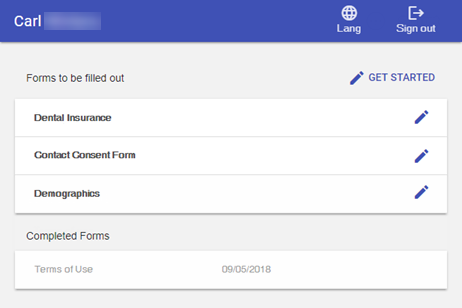
Their completed forms and forms that require their attention display.
-
To start a form, the patient clickstaps GET STARTED or selects a listed form.

-
The patient enters the appropriate information.
If the form has multiple sections, the patient can use the navigation icons or buttons to navigate as they complete sections.

Note: If the form has a Signature section, the patient can sign using a mouse or their finger (on touch-enabled devices only).
-
When ready, the patient clickstaps Save.
Tip: If the patient needs to complete the form later, clicktap FINISH LATER.
Important: If the patient signs out of their portal, any unsaved information will be lost.
-
When the patient completes and saves a form, the next one starts automatically. The patient repeats Steps 5-6 until all necessary forms are complete.
A message displays when all forms are complete.

-
When ready, the patient clickstaps Sign out.
Comments
0 comments
Please sign in to leave a comment.