
If you must prescribe controlled medications from eRx, you must complete the TFA authentication process.
Important: You cannot complete the TFA authentication process until you have received the letter containing your Session ID that is issued after you successfully complete the IDP process.
Notes:
-
When the TFA authentication process is ready, you will receive an alert in eRx that contains a link to begin the process.
-
You can access eRx according to your security rights.
To complete the TFA authentication process
How to get to there
-
From the Patient menu, clicktap Prescriptions to display the Patient Prescriptions page.
-
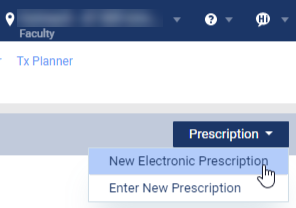
ClickTap the Prescription drop-down menu and select New Electronic Prescription.
Note: If logging in as a proxy clinician, you are prompted to select the clinician you are acting on behalf of.
The Electronic Prescriptions window and the Patient Details page display.
-
On the Patient Details page, the Alerts (
 ) icon and when the Alerts window displays, clicktap the link to open the TFA authentication window.
 -
In the available field, enter your cell phone number and clicktap Next.
Within a few minutes, two text messages will be delivered to your phone.
-
Open the first text message and clicktap the link to download the Duo app.
-
Open the second text message to link to two-factor authentication and receive a six-digit TFA code.
-
Back in eRx, enter the Session ID from the letter, the app token from the Duo app, and the PIN you set during the IDP process and clicktap Next.
A message displays informing that you have completed TFA authentication.
Comments
0 comments
Please sign in to leave a comment.