
If you must prescribe controlled medications from eRx, you must complete the Identity Proofing (IDP) process.
Important: The information collected through IDP is used to verify the user's identity, but is not stored.
Notes:
-
When the IDP process is ready, you will receive an alert in eRx that contains the a link to begin the process.
-
You must successfully complete both the IDP process and the TFA authentication process before you can prescribe controlled medications.
-
You can access eRx according to your security rights.
To complete the Identity Proofing process
How to get to there
-
From the Patient menu, under General, clicktap Prescriptions.
The Patient Prescriptions page displays.
-
ClickTap the Prescription drop-down menu and select New Electronic Prescription.
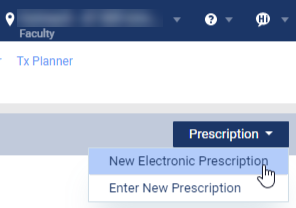
Note: If logging in as a proxy clinician, you are prompted to select the clinician you are acting on behalf of.
The Electronic Prescriptions window and the Patient Details page display.
-
On the Patient Details page, clicktap the Alerts (
 ) icon to display the Alerts window.
 -
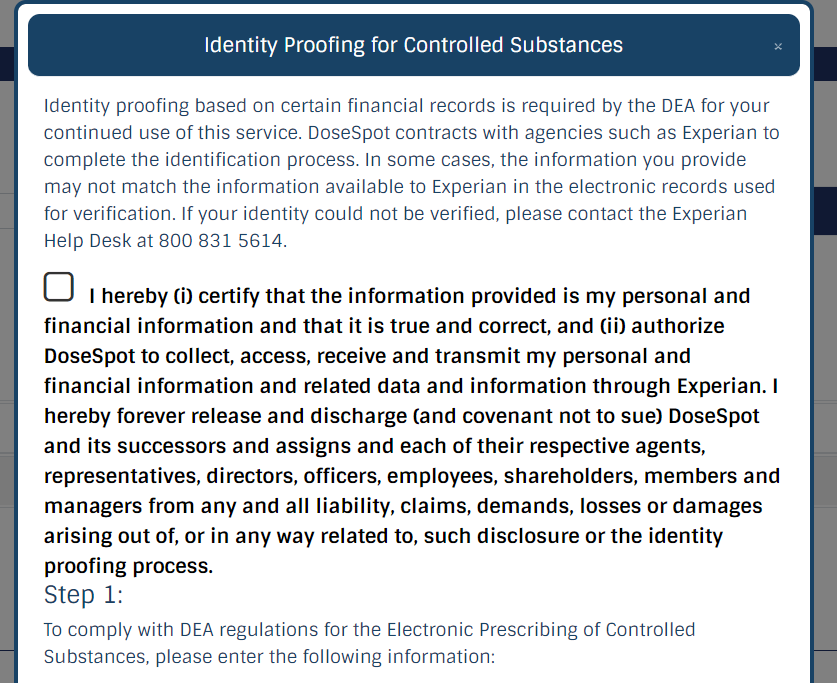
ClickTap the Please complete Identity Proofing for Controlled Substances link to open the Identity Proofing for Controlled Substances window.
-
Select the check box to authorize DoseSpot to collect your personal and financial information.
-
Complete the personal information fields and clicktap Next.
-
Legal First, Middle, and Last Name
-
Home Address, City, State, and Zipcode
-
Date of Birth
-
Home Phone Number
-
Social Security Number
-
Credit Card Number

-
-
Answer the identifying questions pulled from your financial and credit history and clicktap Next.
If answered successfully, a message displays, informing you that you have completed IDP.
-
In the available field, set a four-digit PIN and clicktap Next to close the window.
Comments
0 comments
Please sign in to leave a comment.