
You can remove a patient's medical alerts (conditions and diseases) from their record. Alternatively, you can set a medical alert as expired.
To remove a patient's medical alert
How to get there
-
From the Patient menu, under General, select Overview.
The patient's Overview page displays.
Note: If the correct patient is not already selected, use the Patient Search field to access the patient's record.
How to get there
-
Next to the Patient Search field, clicktap the
 icon.
icon.
Note: The
icon only displays if the patient has a medical alert. The Patient Information page displays with the Medical Alerts tab selected.
Tip: You can also access the Medical Alerts tab from the Patient menu > Medical Alerts option.
Note: If the correct patient is not already selected, use the Patient Search field to access the patient's record.
-
Complete one of the following:
-
On a patient's Overview page, select a medical alert from the Medical Alerts widget.

-
On a patient's Patient Information page > Medical Alerts tab, select a medical alert.

The Edit Medical Alert window displays.

-
-
ClickTap Delete.
-
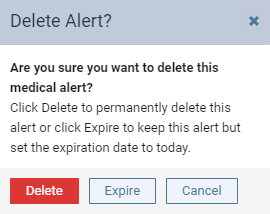
When prompted to confirm, clicktap Delete.
Comments
0 comments
Please sign in to leave a comment.