
The Daily Huddle Dashboard - Production, Collections displays a collection of reports that contains the daily practice details on your location's production and collections. Use this dashboard during your office's morning staff meetings to provide some daily statistics to help you focus on the patients coming in for treatment on the current day and/or the following day.
To view the Daily Huddle dashboard
How to get there
-
From the Home menu, under Reports, clicktap Power Reporting.
The Power Reporting page displays.
How to get there
-
From the Home menu, under Reports, clicktap Insights.
The Insights page displays.
-
Complete one of the following:
-
Open the Power Reporting page and clicktap the Daily Huddle Dashboard - New Patients icon.
-
Open the Insights page and under Schedule Optimization, clicktap Daily Huddle Dashboard - New Patients.
-
Completed Production - Yesterday - The report displays the total dollar amount of production per specialty (such as General Practice or Hygienist) of the providers associated with the procedures posted yesterday. The report also displays a combined total dollar amount.
-
Completed Production - MTD - The report displays the total dollar amount of production per specialty (such as General Practice or Hygienist) of the providers associated with the procedures posted within this month. The report also displays a combined total dollar amount.
-
Scheduled Production - Today - The report displays the total dollar amount of the scheduled gross production per specialty (such as General Practice or Hygienist) of the providers assigned to appointments scheduled for today. The report also displays a combined total dollar amount.
-
Collections - Yesterday - The report displays the dollar amount of collections from yesterday as a negative number.
-
Collections - MTD - The report displays the dollar amount of collections that were collected within the current month as a negative number.
-
Scheduled Production - Remaining Month - The report displays the total dollar amount of the scheduled gross production per specialty (such as General Practice or Hygienist) of the providers assigned to appointments scheduled for today and until the end of the month. The report also displays a combined total dollar amount.
-
Collections % - Yesterday - The report displays the percentage of collections from yesterday as a negative number.
-
Collections % - MTD - The report displays the percentage of collections that were collected within the current month as a negative number.
The Daily Huddle displays.
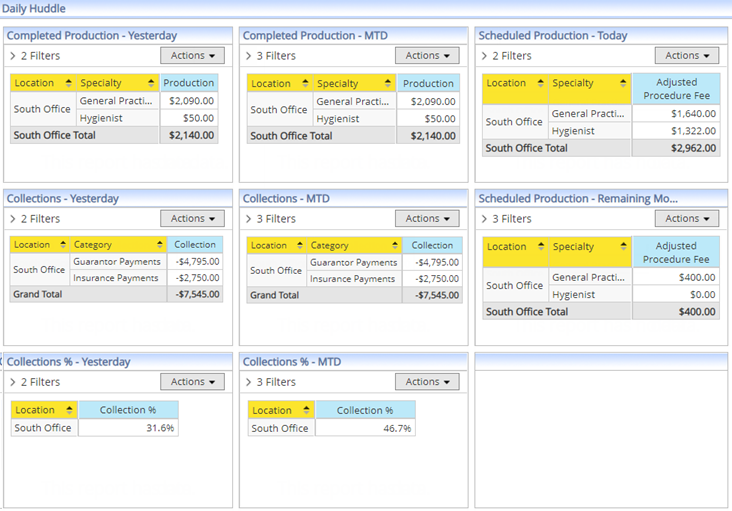
The dashboard contains the following reports:
-
-
(Optional) Clicktap the Data as of button to view the time when the next sync is expected to occur.

Note: Data from your database automatically syncs with the reporting system and displays the time of the last sync on the button. Data entered after the last sync will not be available on the report until the next sync.
The Sync Info window displays.

-
(Optional) Temporarily remove filter(s) from a report.
-
ClickTap Filters to expand the Filters list.

A list of filters applied to the report displays.
-
ClickTap a filter's X to temporarily remove the corresponding filter.
-
ClickTap the X to close the list.

-
-
(Optional) ClickTap the Actions menu to select an option for viewing grand totals and/or viewing the report as a table or various types of charts.
-
(Optional) Export the report.
-
ClickTap the Actions menu.

-
Select Export to PDF or Export to Excel to export as a PDF or an Excel file.
If you export as a PDF file, the PDF displays on your window's new tab. If you exported as an Excel file, the report is downloaded.
-
For PDF, address the PDF file accordingly by downloading or printing it. Skip this step if you exported the report as an excel file.
-
Comments
0 comments
Please sign in to leave a comment.