
If you have already completed your copy of an evaluation, you can remind faculty to complete their copy of the evaluation.
Note: You can manage evaluations according to your security rights for Academic Evaluations.
To remind faculty about an evaluation
How to get to there
-
From the Academic menu, clicktap Student Evaluations.
The Student Evaluations page displays.
-
On the Student Evaluations page, clicktap the Completed tab to display a list of your completed evaluation requests.
-
(Optional) Filter the list of evaluations as necessary:
-
ClickTap the Date Range field and select an option to display evaluations within a certain range.
Note: The field defaults to today's date.
-
If you selected Specific Date, select a date from the calendar that displays and clicktap Done.
-
If you selected Custom Range, select two dates from the calendar that displays and clicktap Done.
-
-
ClickTap the
 column header as necessary to sort the requests by competency or sessional evaluations.
-
-
Next to a listed evaluation, under the Faculty Evaluation column, clicktap Remind Faculty.
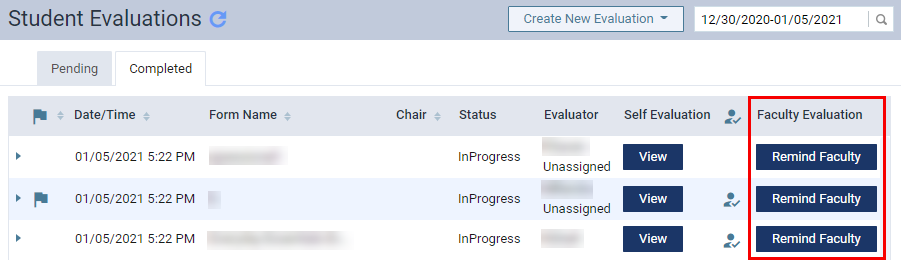
Note: This does not affect the evaluation's placement in the faculty evaluation list.
Tip: For in-progress evaluations, under Evaluator column, you can check if faculty has completed their copy of the evaluation. If completed, a check mark
 icon displays beside their masked name.
Comments
4 comments
When selecting the "remind" button, does that move the evaluation to today (to the top of the list)?
Hi Melissa, when a user clicks the Remind button, a notification is sent to the faculty member via the phone application. It does not alter anything about the evaluation itself and will not move it to the top.
A nice feature to add to this would be a way for faculty to remind students. Also, is there a setting where the student must complete their self eval prior to being sent to the faculty to do the final evaluation?
Hi Jennifer, thanks for the feedback! You can submit a ticket with your enhancement idea from here: https://support.ascendacademic.com/hc/en-ca/requests/new.
At this point in time, no, there is no setting that controls the timing of evaluations. Evaluations with multiple copies generate at the same time once the student completes work that requires evaluation.
Please sign in to leave a comment.