
You can view a provider's unsigned and/or incomplete clinical notes from the Clinical Note Tasks Report.
Note: You need the Clinical Note Tasks Report security right.
To view a provider's clinical note tasks
How to get there
-
From the Home menu, under Reports, clicktap Clinical Note Tasks.
The Clinical Note Tasks Report page displays.
-
From the Clinical Note Tasks Report page, run the Clinical Note Tasks report.
-
Review the report results as necessary.
-
ClickTap a provider name to display a Clinical Note Tasks window and view the clinical notes for that provider.
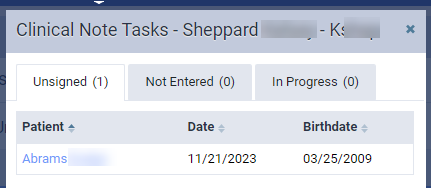
The provider's clinical notes are grouped by status (Unsigned, Not Entered, and In Progress) and separated into tabs.
-
ClickTap a tab to see a list of the provider's patients who have notes with that status. This includes the patient's name, date of the clinical note, and patient's birth date.
-
(Optional) ClickTap a column header to sort the list by that column.
Note: By default, the list is sorted by patient last name.
-
(Optional) ClickTap a patient's name to open the patient's Progress Notes page in a new tab and sign, enter, or complete the clinical note.
Comments
0 comments
Please sign in to leave a comment.