
You can track a sent claim by viewing its information and if necessary, editing, resubmitting, reprinting, splitting, or deleting the claim.
To track a sent claim
How to get to there
-
From the Home menu, under Insurance, clicktap Sent Claims.
The Sent Claims page displays.
How to get there
-
Use the Patient Search field to access a patient's record.
Notes:
-
If the past patient record you accessed since you past logged on is the correct patient's record, you do not need to re-enter the patient's name in the Patient Search field.
-
You can include inactive patients in the search results by setting the Include inactive patients toggle switch to On.
-
-
From the Patient menu, under Insurance, clicktap Insurance Claims.
The patient's Insurance Claims page displays.
How to get there
-
Use the Patient Search field to access a patient's record.
Notes:
-
If the past patient record you accessed since you past logged on is the correct patient's record, you do not need to re-enter the patient's name in the Patient Search field.
-
You can include inactive patients in the search results by setting the Include inactive patients toggle switch to On.
-
-
Complete one of the following:
-
From the Patient menu, under Financial, clicktap Ledger.
-
From the Patient menu, under General, clicktap Overview.
The patient's Overview page displays.
ClickTap the Ledger widget.

The patient's Ledger page displays.
-
-
Complete one of the following:
-
On the Sent Claims page, clicktap a claim with a Sent status.

Note: Claims are sorted by their dates of service in chronological order.
-
On a patient's Insurance Claims page, clicktap a claim.
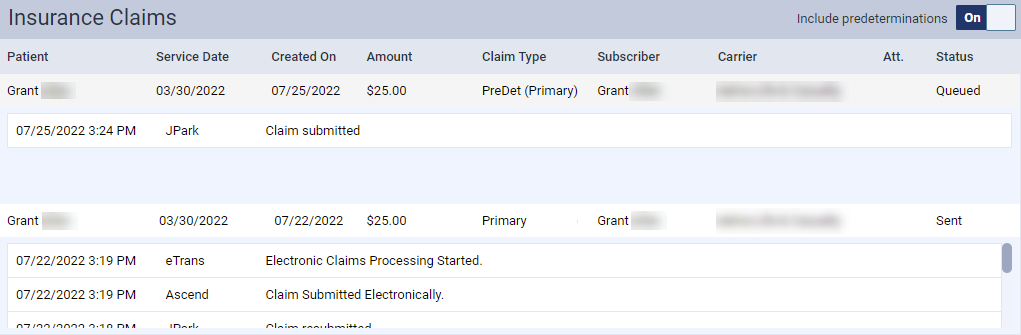
-
On a patient's Ledger page, clicktap a claim.

The Claim Detail window displays.

-
-
Complete one of the following:
-
To delete the claim, clicktap Delete Claim.
-
To resubmit the claim, clicktap Resubmit.
Note: This button is not available for claims with a Queued status.
-
To print the claim, clicktap Print.
-
To split the claim, clicktap Split Claim.
Note: This button is only available if the claim is a primary claim, has not been paid, and has at least two attached procedures.
-
Comments
0 comments
Please sign in to leave a comment.