
You can edit the details of any insurance carrier that has been entered into Ascend Academic manually. You cannot edit an insurance carrier that was added to the system from the list of supported carriers maintained by Henry Schein Practice Solutions.
To update an insurance carrier
How to get there
-
From the Home menu, under Insurance, select Carrier.
The Insurance Carriers page displays.
-
On the Insurance Carriers page, select an insurance carrier.
Tip: To help you locate an insurance carrier quickly, in the Filter field, type part or all of a carrier's name, Payer ID, plan/employer, or group number to filter the carrier list so that it displays only those carriers that match what you enter.

The options for editing the insurance carrier's information become available.
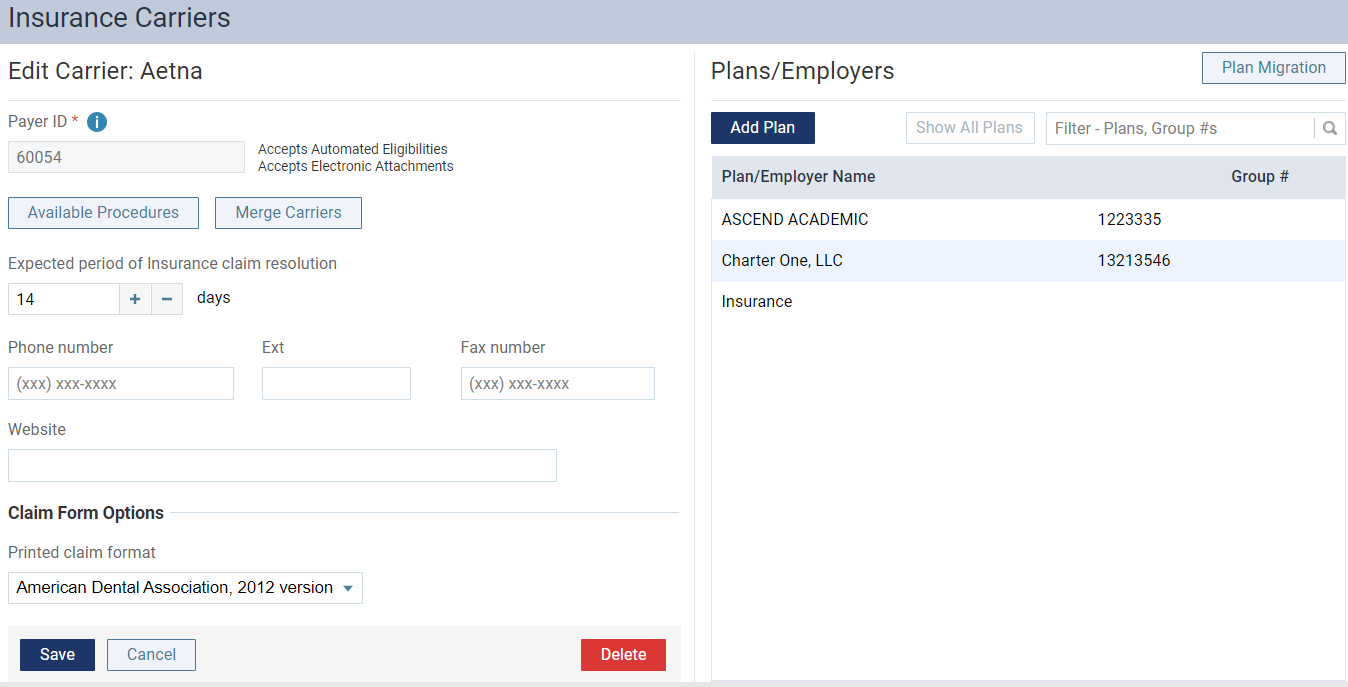
-
Update the insurance information, such as the phone or fax number, as needed.
Set up the following options:
-
Expected period of insurance claim resolution - The number of days after which you want to consider claims that are sent to the insurance carrier as being overdue. By default, the turnaround time is set to 14 days, but you can specify a different number of days to reflect the time frame that the carrier usually requires to process claims.
-
Phone number - The insurance carrier's main contact phone number and Extension (if applicable).
-
Fax number - A fax number for the insurance carrier.
-
Website - The insurance carrier's website address.
-
Printed claim format - For printed claims, select the ADA claim format that this carrier accepts: 2012, 2019, or 2024.
-
Available Procedures - To specify which procedures are available for posting to the records of patients who are covered by this carrier (when the "Carrier procedures" procedure filter is selected during posting), click this button.
Notes:
-
You cannot change the name of the carrier.
-
You cannot change the insurance carrier's Payer ID.
-
-
ClickTap Save.
Comments
0 comments
Please sign in to leave a comment.