
By default, Ascend Academic automatically calculates the estimated primary and secondary insurance portions, write-off, and guarantor portion for each procedure. However, you can turn off the automatic calculation for an unpaid procedure and modify the estimated primary and secondary insurance portions and write-off (which changes the guarantor portion accordingly).
Note: You must have the Manage Outstanding Insurance Estimates security right to turn off automatic insurance estimates for a procedure.
To edit outstanding insurance estimates
How to get there
-
From the Patient menu, under Financial, select Ledger.
The patient's Ledger page displays.
Tip: You can also access the Ledger page from the patient's Overview page > Ledger widget.
Note: If the correct patient is not already selected, use the Patient Search field to access the patient's record.
-
Open a patient's Ledger page.

-
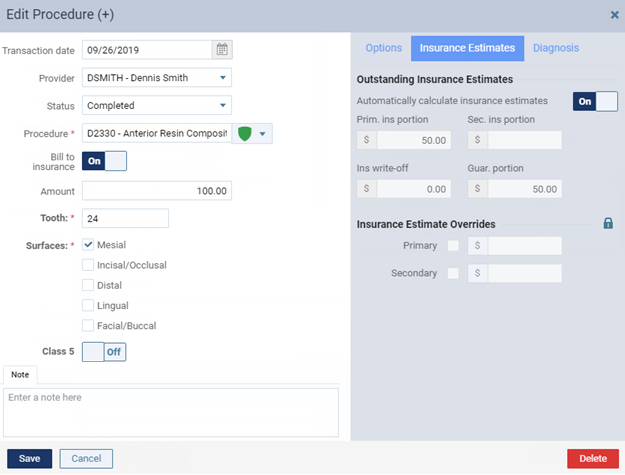
Select an unpaid procedure to display the Edit Procedure or View Procedure window.
Note: The View Procedure window displays if the procedure is locked.
-
If the procedure is locked, unlock it.
-
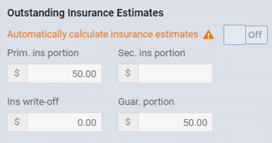
On the Insurance Estimates tab, under Outstanding Insurance Estimates, set the Automatically calculate insurance estimates toggle to Off.
The options become available for editing.
Important: Turning off automatic insurance estimates has the following repercussions:
-
The benefit maximums and required deductibles are not used to calculate estimates for this procedure.
-
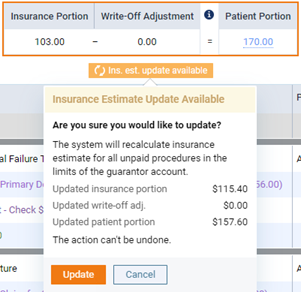
When changes that affect insurance estimates cause the Ins. est. update available flag to display on the patient's Ledger, Patient Portion, or Guarantor Portion page, updating the estimates for unpaid procedures does not update the estimates for this procedure, so the estimates for it may need to be updated manually.
-
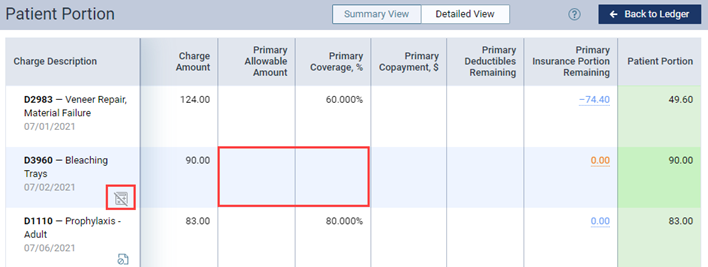
While using the Detailed View of the Patient Portion or Guarantor Portion page, a crossed-out calculator symbol displays next to the procedure to indicate that insurance estimates are not being calculated automatically, and the allowable amounts and coverage percentages do not display.
-
-
Modify any of the following as applicable:
-
Prim. ins portion - The portion of the charge that the primary insurance carrier is responsible for.
-
Sec. ins portion - The portion of the charge that the secondary insurance carrier is responsible for.
-
Ins write-off - The portion of the charge to be written off as an insurance credit adjustment.
Notes:
-
The Guar. portion updates accordingly.
-
The sum of all the values cannot exceed the amount being charged for the procedure.
-
-
ClickTap Save.
Comments
0 comments
Please sign in to leave a comment.