
You can specify the list of procedures providers can post on the records of patients that are covered by insurance carriers.
To customize the available procedures for an insurance carrier
How to get there
-
From the Home menu, under Insurance, select Carriers.
The Insurance Carriers page displays.
-
On the Insurance Carriers page, select an insurance carrier.

Tip: To quickly search for a insurance carrier, enter part or all of the carrier's name, plan/employer, or group number in the Carrier > Plan Search (Practice) field.
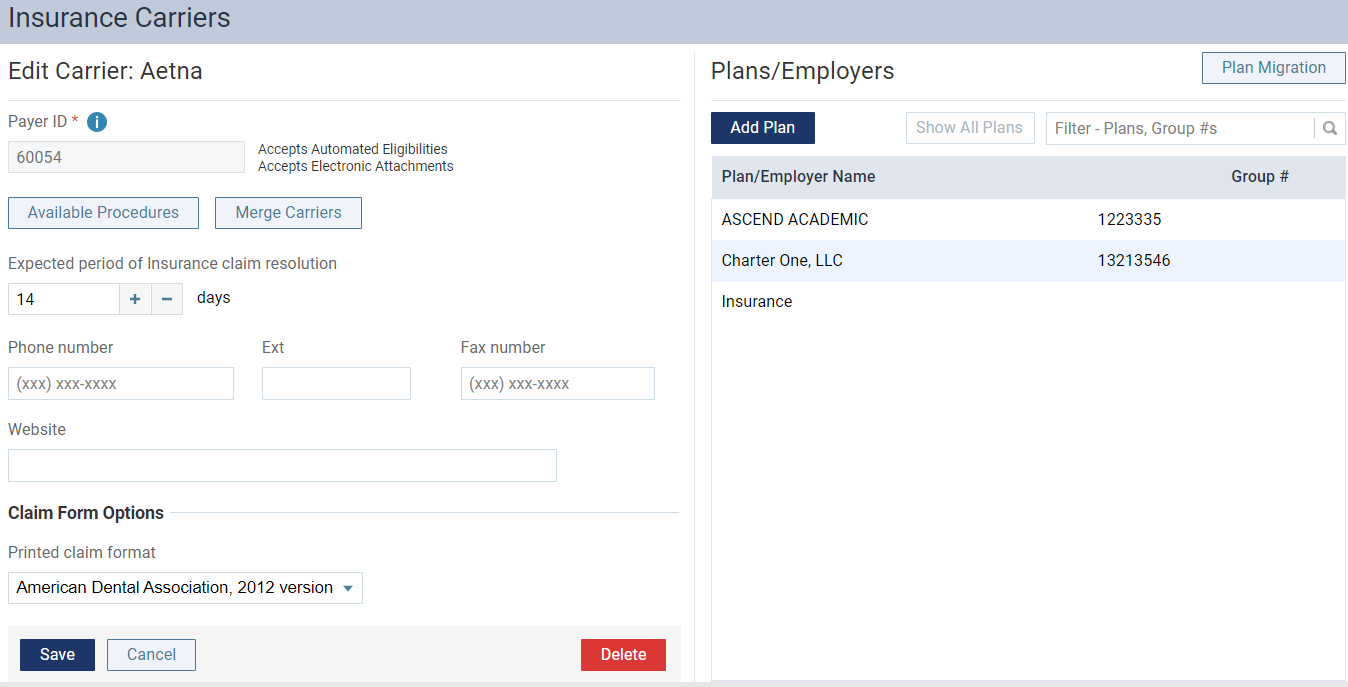
The options for editing the insurance carrier's information become available.
-
ClickTap Available Procedures.
-
From the Available Procedures window, select or deselect a procedure's check box to add to or remove from the list as necessary.
Tips:
-
You can select or deselect the check box in the list's header to add or remove all procedures from the list.
-
You can use the Search for specific procedure field to quickly search for a specific procedure by entering the procedure code or description into the field.

Note: The window only displays active procedure codes.
-
-
ClickTap Save.
-
On the Edit Carrier page of this insurance carrier, clicktap Save to save the changes or clicktap Cancel to cancel the changes.
Comments
0 comments
Please sign in to leave a comment.