
After a student provider completes a procedure, one or more faculty members must complete a competency evaluation to record an assessment of their work. A competency evaluation is a formal assessment that directly relates to required coursework and a specific appointment.
If necessary, a competency evaluation can be created by a student provider or a faculty member without an appointment.
Note: Generally, a competency evaluation is created when a student provider manually requests one from an appointment.
To create a competency evaluation
How to get to there
-
From the Academic menu, clicktap Faculty Evaluations.
The Faculty Evaluations page displays.
How to get to there
-
From the Academic menu, clicktap Student Evaluations.
The Student Evaluations page displays.
-
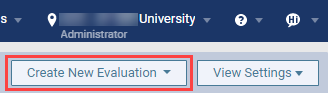
On the Faculty Evaluations page or Student Evaluations page, clicktap Create New Evaluation and select Competency to display the Request Competency Evaluation window.
-
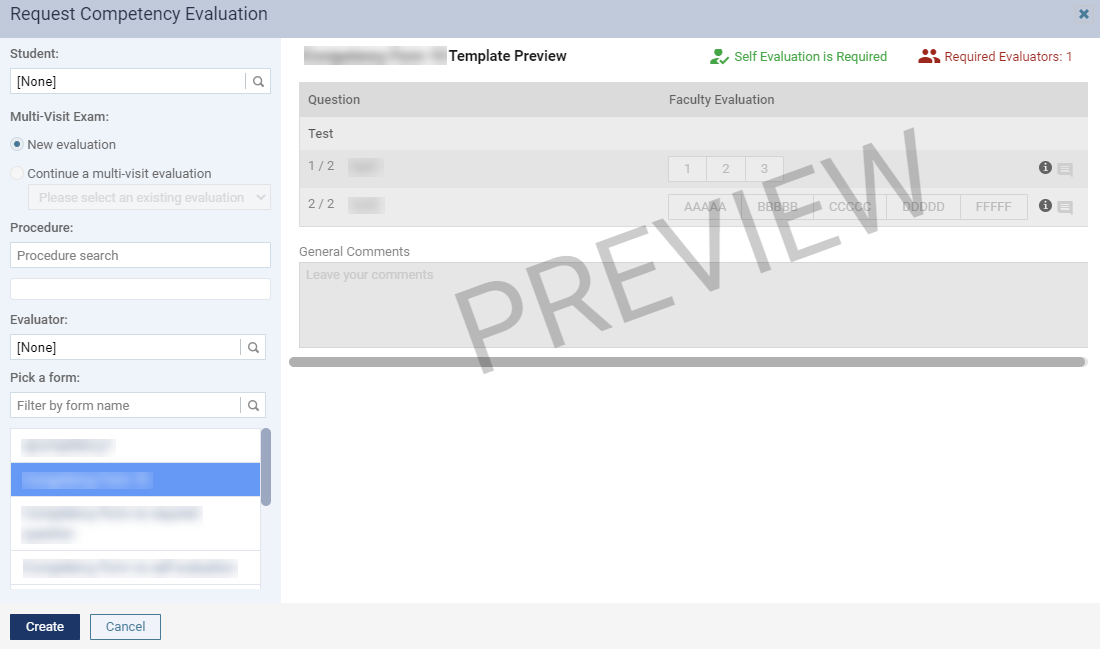
Set the following fields as necessary:
-
Student - Enter a student provider that will be assigned to the evaluation.
Note: This field is disabled if you open the window from the Student Evaluations page.
-
Multi-Visit Exam
-
New evaluation - Select the radio button to create a new evaluation.
-
Continue a multi-visit evaluation - Select the radio button to continue an existing evaluation. Once selected, clicktap the enabled Please select an existing evaluation field and select the evaluation in the drop-down list.
Note: If selected, the Student, Procedure, and Select a form fields are disabled as you are continuing an existing evaluation and its set student provider, procedure(s), and the evaluation form will be applied to the new evaluation.
-
-
Procedure - Enter a procedure that requires evaluation and select from the generated list. To add multiple, repeat this step as necessary.
-
Evaluator - Enter a faculty provider that will be assigned to the evaluation. The number of the fields are based on the selected evaluation form.
-
Pick a form - Select a listed evaluation form. If necessary, you can review the preview displayed on the right half of the window and the required number of evaluator(s) for the form.
Tip: You can use the Filter by form name search field to locate a specific evaluation form.
-
-
ClickTap Create.
The evaluation displays on the page.
Comments
0 comments
Please sign in to leave a comment.