
Unlike regular patient records, you can delete simulation (sim) patient records to remove them from the system. However, you can't delete simulation patient templates, but you can still delete sim patients that were duplicated from a template. Once deleted, the patients' records and appointments no longer display in the system. Also, the deletion is audited in the system.
Important: You need the Delete simulation patients security right to delete sim patient records.
Tip: If a sim patient template is no longer necessary, you can inactivate it like a regular patient record.
To delete simulation (sim) patients
How to get there
-
From the Settings menu, under Patient Care, clicktap Simulation Patients.
The Simulation Patients page displays.
-
On the Simulation Patients page, complete one of the following:
-
To delete sim patient records, select the Simulation Patients without Templates section to expand it and clicktap All Simulation Patients without Templates.

A list of sim patients display.

-
To delete sim patient records that were created from a template, select the Simulation Patients with Templates section to expand it and select a template.
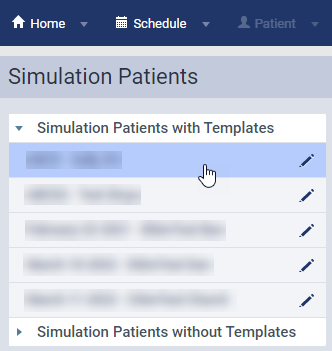
A list of template's existing copies display.

-
-
Select the check box(es) of the sim patient(s) you want to delete.
Tip: To select all, select the check box in the header.
-
ClickTap Delete.
-
When prompted, clicktap Proceed.
Tip: As simulation patient deletions are audited in the system, you can view information on the deletion whenever on the Audit Log. Deletions are audited as a Delete action type with a [SIM] label beside the patient's name.

Comments
1 comment
Sim patients with templates (not only patients created FROM sim templates) should be deletable. Why is this not being addressed?
Please sign in to leave a comment.