
You can view a list of simulation (sim) patients at your location on the Simulation Patients page.
Note: You need the Create simulation patients security right to access the Simulation Patients page.
To view a list of simulation patients
How to get there
-
From the Settings menu, under Patient Care, clicktap Simulation Patients.
The Simulation Patients page displays.
-
On the Simulation Patients page, generate one of the following:
-
A list of sim patients that aren't associated with a template
-
Expand the Simulation Patients without Templates section and clicktapAll Simulation Patients without Templates.

A list of simulation patients without templates in your organization displays.

-
-
A list of sim patients that were created from a specific template
-
Expand the Simulation Patients with Templates section and select a template.
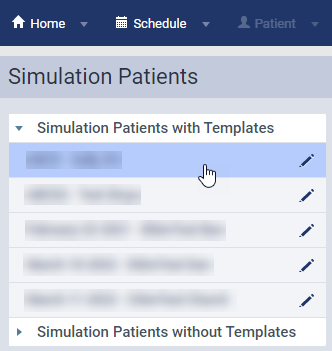
A list of sim patients created from the template displays.

-
-
-
(Optional) Select a listed sim patient to see their patient information.
Comments
0 comments
Please sign in to leave a comment.