
Normally, adults have 32 permanent teeth, and children have 20 baby teeth. In some cases, however, a patient may have extra teeth in their mouth called supernumerary teeth. When you need to chart treatment for a patient with a supernumerary tooth, Ascend Academic makes the process easy if you use the following guidelines based on ADA recommendations:
-
When charting permanent teeth, add 50 to the closest standard tooth number. For example, if a supernumerary tooth is adjacent to tooth 12, the tooth number entered would be 62.
-
When charting primary teeth, add the letter S after the closest standard tooth number. For example, if a supernumerary tooth is adjacent to tooth T, the tooth number entered would be TS.
To chart supernumerary teeth
How to get there
-
From the Patient menu, under Clinical, select Chart.
The patient record displays with the Chart tab selected.
Tip: You can also access the chart from other clinical areas such as Imaging, Progress Notes, Quick Exam, Perio, or Tx Planner.
Note: If the correct patient is not already selected, use the Patient Search field to access the patient's record.
-
On the patient's record > Chart tab, select the tooth closest to the supernumerary position, and click Add Condition.

-
Search for and select the Supernumerary Tooth condition to add the condition to the chart.
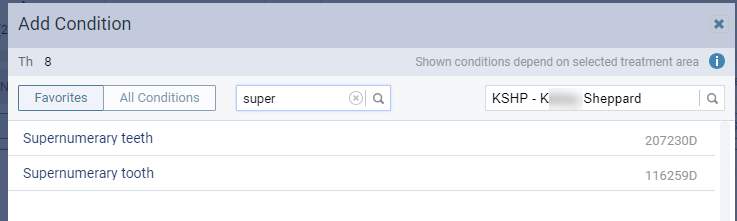
-
Go to the patient's Progress Notes tab and select that condition.

-
In the Edit Condition window, edit the Tooth number to be the supernumerary tooth number, and click Save.

The updated tooth number displays in the Progress Notes tab.
Notes:
-
Numbers 51 through 82 identify supernumerary teeth in permanent dentition. In other words:
-
Supernumerary #51 is closest to the upper right molar, which is tooth #1 (1+50=51).
-
Supernumerary #82 is closest to the lower right third molar, which is tooth #32 (32+50 =82).
-
-
This tooth numbering schema is approved by the ADA.
-
The chart does not display supernumerary teeth. You must use the Progress Notes tab to track them. After you change the tooth number in the Progress Notes, any procedure (and its associated charting symbol) that you added to the closest tooth disappears from the chart.
-
Comments
0 comments
Please sign in to leave a comment.