
In a patient's clinical chart, you can quickly view or edit notes and surfaces for a tooth with a charted watch tooth (delay treatment) condition (SNODENT code 179235D).
To quickly view or edit details about a watched tooth
How to get there
-
On the Patient menu, under Clinical, select Chart.
The patient's clinical record displays with the Chart tab selected.
Note: If the correct patient is not already selected, use the Patient Search field to access the patient's record.
-
On the Chart tab of a patient's clinical record, clicktap a tooth's W icon.
Note: Conditions with a note entered display a flag behind the W.

Tip: If multiple watch tooth (delay treatment) conditions have been charted for the tooth, only the details of the most recent one display.
-
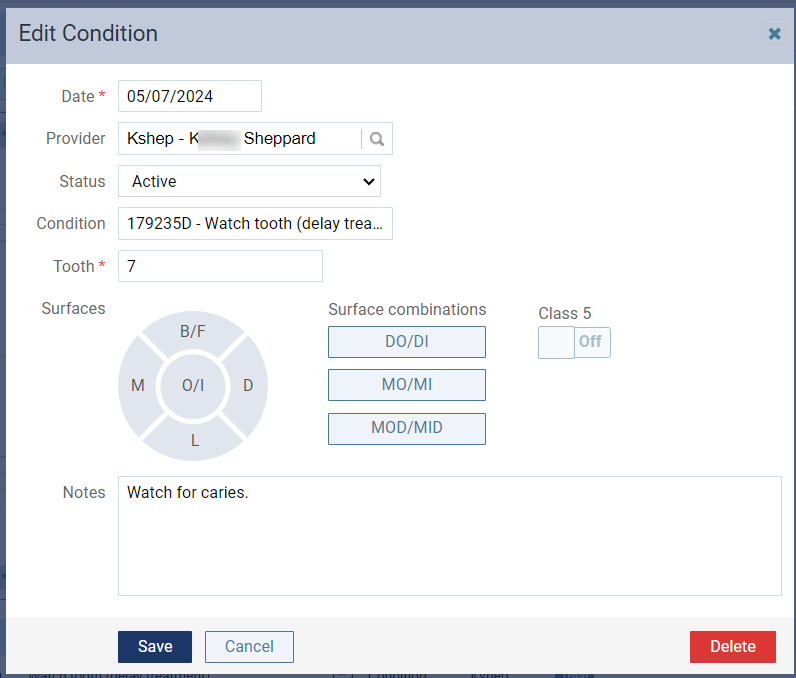
When prompted with a pop-up box, clicktap the surfaces diagram or the Edit link to display the Edit Condition window.

-
Make the necessary changes and clicktap Save.
Comments
0 comments
Please sign in to leave a comment.