
When a patient's insurance coverage expires or is terminated, you can enter an ending date for the coverage period of that plan in their patient record. This will affect all patients who are covered under this insurance plan. This will not affect claims already submitted to the corresponding carrier.
To end the coverage of a patient's insurance plan
How to get there
-
From the Patient menu, under General, select Overview.
The patient's Overview page displays.
Note: If the correct patient is not already selected, use the Patient Search field to access the patient's record.
How to get there
-
From the Patient menu, under Insurance, select Insurance Information.
The patient's Insurance Information page displays.
Note: If the correct patient is not already selected, use the Patient Search field to access the patient's record.
-
Complete one of the following:
-
On a patient's Overview page, the Insurance widget displays the patient's insurance plans. ClickTap an insurance plan's link.

-
On a patient's Insurance Information page, select an insurance plan.

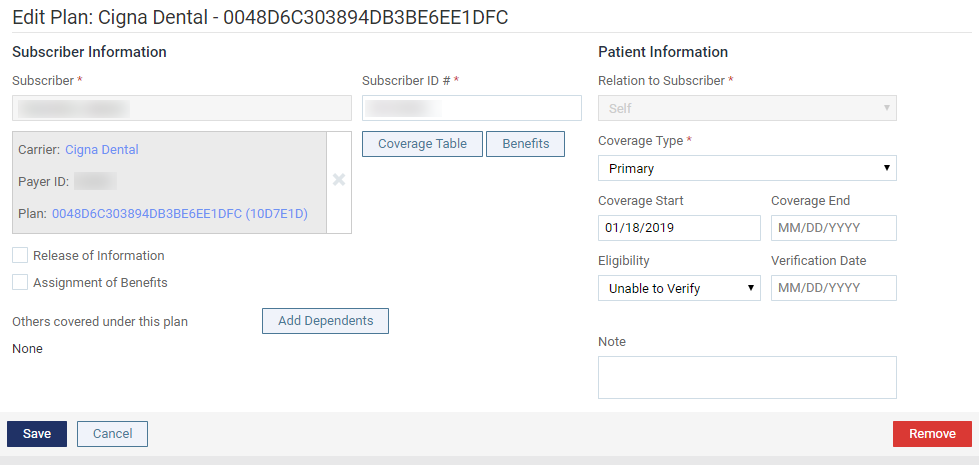
The options for editing insurance information become available.
-
-
Complete one of the following:
-
Change the Coverage End date to reflect the date that the plan expired or was terminated, and then clicktap Save.
-
To use yesterday's date as the End Coverage date, clicktap Remove, and then clicktap End Coverage on the generated confirmation message.
A confirmation message displays to remind you that the Coverage End date will be changed for all patients covered by this insurance plan.
-
-
ClickTap OK.
Comments
0 comments
Please sign in to leave a comment.