
Occasionally a perio exam may be deemed invalid for a patient. If the exam was finished more than 48 hours in the past, you can void the perio exam. If the exam was finished within the past 48 hours, you can delete the exam.
Note: Draft exams that were started and completed over a longer period of time can only be voided.
Important: You cannot delete or void a perio exam that is attached to a claim.
To void a perio exam
How to get there
-
From the Patient menu, under Clinical, select Perio.
The patient's clinical record displays with the Perio tab selected.
Note: If the correct patient is not already selected, use the Patient Search field to access the patient's record.
-
On a patient's clinical record > Perio tab, clicktap the exam drop-down list and select an exam.

-
ClickTap the Manage button menu and select Void Exam.
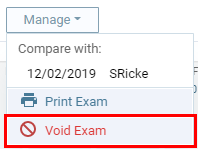
The Void Exam window displays.

-
Enter the reason that you are voiding the exam and clicktap Void.
Comments
0 comments
Please sign in to leave a comment.