
You can edit the required deductibles and maximum benefits that are attached to an insurance plan. Along with coverage tables, deductibles and benefits allow for accurate insurance estimates.
Tip: You can edit the deductibles met and benefits used for the current and previous years of a patient's insurance plan.
To edit deductibles and benefits
How to get to there
-
From the Home menu, under Insurance, select Carriers.
The Insurance Carriers page displays.
-
On the Insurance Carriers page, select an insurance carrier.
The options for editing the insurance carrier display.
-
Under Plans/Employers, select an insurance plan.
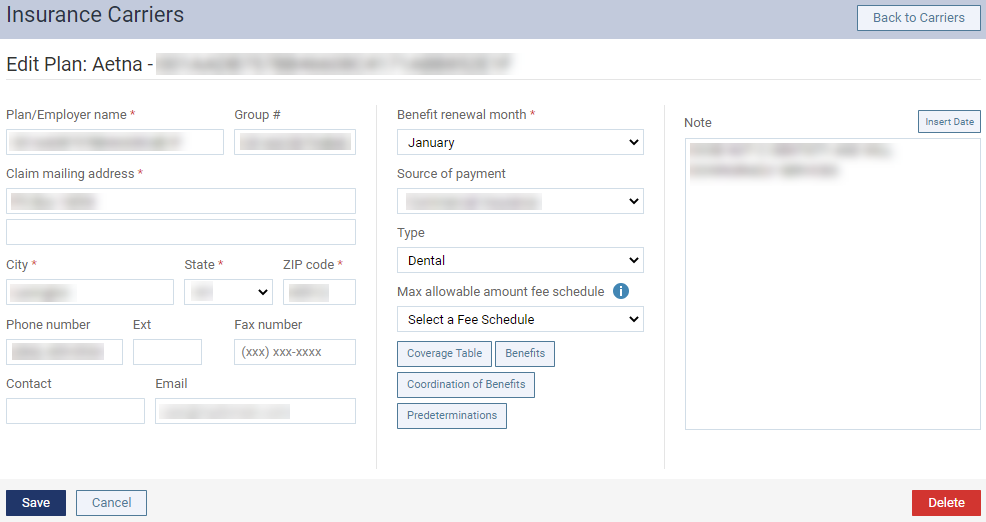
The options for editing the insurance plan display.
-
ClickTap Benefits.
The Deductibles and Benefits window displays.

-
Change the deductibles and benefits of the plan as needed.
Note: Currently Ascend Academic calculates the deductible for each category. If there is only one deductible, enter the amount of the deductible in the Preventive, Basic, or Major field in each column (Annual Individual, Annual Family, and Lifetime Individual) as applicable unless preventive procedures do not require a deductible; in which case, enter the amount of the deductible in the Basic or Major field in each column as applicable. This will prevent Ascend Academic from calculating the deductible twice for a procedure, and it will not matter which type of procedure you post first. Additionally, you must update the coverage table for the plan. Make sure that all procedures, except for preventive procedures if they do not require a deductible, are associated with the deductible type that you entered an amount for.
-
ClickTap Save.
Comments
0 comments
Please sign in to leave a comment.