
After a patient submits a form, staff can open the completed form from the patient record to review the submitted responses, confirm that any required signature was retained, and make available changes. When validating a new or updated form, use a test patient and non-identifying information.
Note: If multiple versions of a completed form are available, the current version displays by default.
Important: When validating a form, use a test patient and non-identifying information. Do not use real patient documents or personal information.
To view and verify a completed patient form
Open the patient record. On the Patient menu, select Patient forms.
Locate the completed or submitted form you want to review.
Confirm that the form shows the expected completion status.
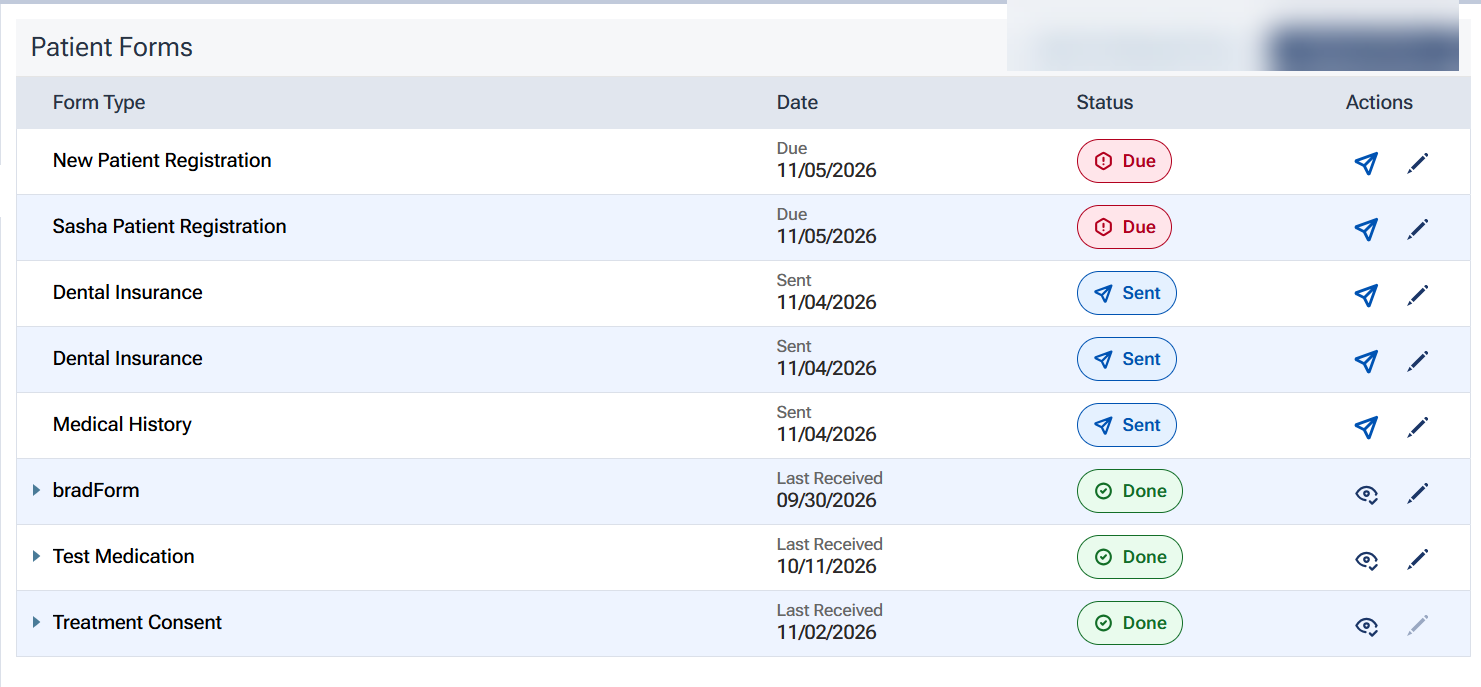
Select the form to open it.
Review the submitted information and confirm that:
The patient responses were saved correctly.
The patient signature is retained, if required.
Uploaded files are available, if applicable.
The provider review is available or completed, if required.
If the patient completed the form more than once, select the applicable previous version to review earlier information.
If information is missing or does not appear as expected during validation, correct the form configuration and test the complete workflow again before publishing.
Comments
0 comments
Please sign in to leave a comment.