
You can change the view of the insurance eligibility list to have it display appointments to suit your preferences. Any changes to the view settings are saved until you log off.
How to get there
-
From the Schedule menu, select Insurance Eligibility.
The Insurance Eligibility page displays.
To customize the insurance eligibility view
-
Open the Insurance Eligibility page and perform any of the following as necessary:
-
To change the date:
-
On the toolbar, clicktap the Date icon to select a date.

-
On the toolbar, clicktap the Back or Forward icon to go back or forward one day or one week (depending on the view setting).

-
On the toolbar, clicktap Today to return to the current date.
-
-
To filter the view:
-
ClickTap the View menu and select the Day or Week radio button.
-
ClickTap Close.

Insurance Eligibility List View
By Day
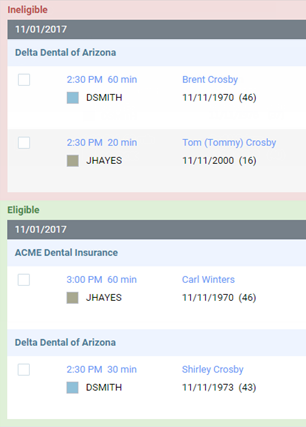

By Week

-
-
To view specific providers:
-
ClickTap the View menu and select or deselect the check box of any providers to view or hide the corresponding appointments as necessary.
-
ClickTap Close.

-
-
Comments
0 comments
Please sign in to leave a comment.