
Operatory groups are collections of operatories. Once grouped together, they allow you to schedule appointments more easily by searching by groups instead of individual operatories. This filters the number of operatories you must search through, narrowing the scope and making it easier to view data and openings.
To create an operatory group
How to get to there
-
From the Settings menu, under Location, select Operatory Groups.
The Operatory Groups page opens.
-
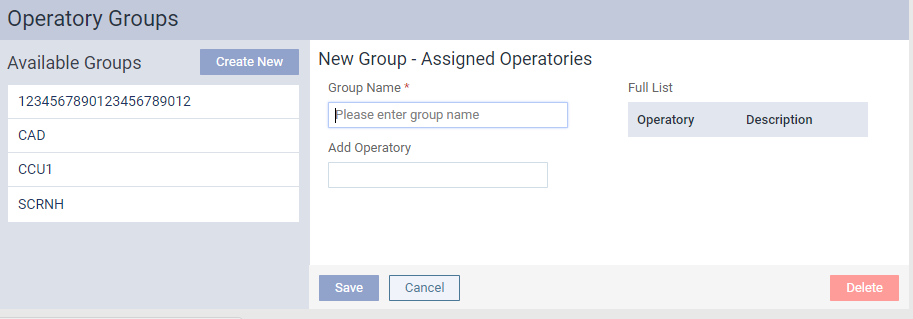
On the Operatory Groups page, clicktap Create New to open the New Group - Assigned Operatories pane.
-
In the Group Name field, enter a unique name.
Note: The field is limited to 25 characters.
-
In the Add Operatory field, begin entering an operatory name and select the operatory.
Tip: If you add an incorrect operatory, under Full List, clicktap the
 icon to remove it from the list.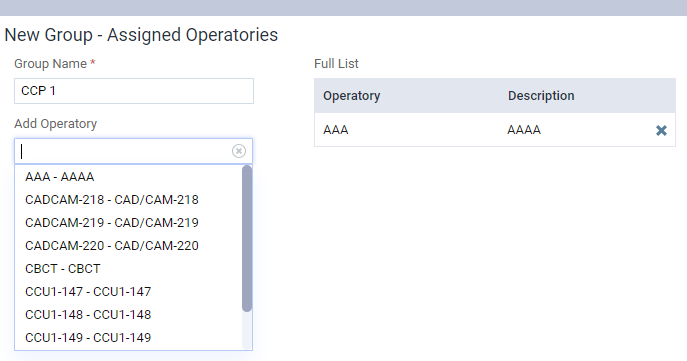
-
(Optional) Repeat Step 3 as necessary.
-
ClickTap Save.
The new group displays in the Available Groups list.
Comments
0 comments
Please sign in to leave a comment.